Publisher Rocket Review: Finding Low-Competition Amazon KDP Niches (2026)
Last updated on October 29th, 2026 at 12:30 pm
I’ve been publishing books on Amazon KDP since 2017, but surprisingly, Publisher Rocket was one of the few popular tools I’d never actually used.
I’d heard about it for years and had seen countless publishers recommend it, but I always relied on my own niche research methods instead.
Recently, I decided it was finally time to see what all the hype was about.
Rather than reading another review or watching someone else’s tutorial, I wanted to test it myself using a real niche I was already researching: math workbooks.
Within a few minutes, I understood why so many KDP publishers recommend it. Instead of relying on gut feeling, Publisher Rocket gave me actual data on search demand, competition, pricing, and estimated earnings before I spent hours creating a new book.
No tool can guarantee a bestseller, but having access to real keyword data is a lot better than guessing.
Here’s how I used Publisher Rocket to find low-competition niche ideas during my first test.
If you’d rather watch the entire process, I’ve also recorded a step-by-step video where I walk through my first Publisher Rocket test in real time. You can watch it here before continuing, or read on for the key takeaways.
🎁 Download 15 FREE KDP Interior Templates
Save time and create beautiful low-content books faster with these 15 ready-to-use KDP interiors — completely free! Perfect for journals, planners, and activity books.
Here’s exactly how I use it to find low competition niche ideas fast, using a recent search for math workbooks as the example.
Starting With One Seed Keyword
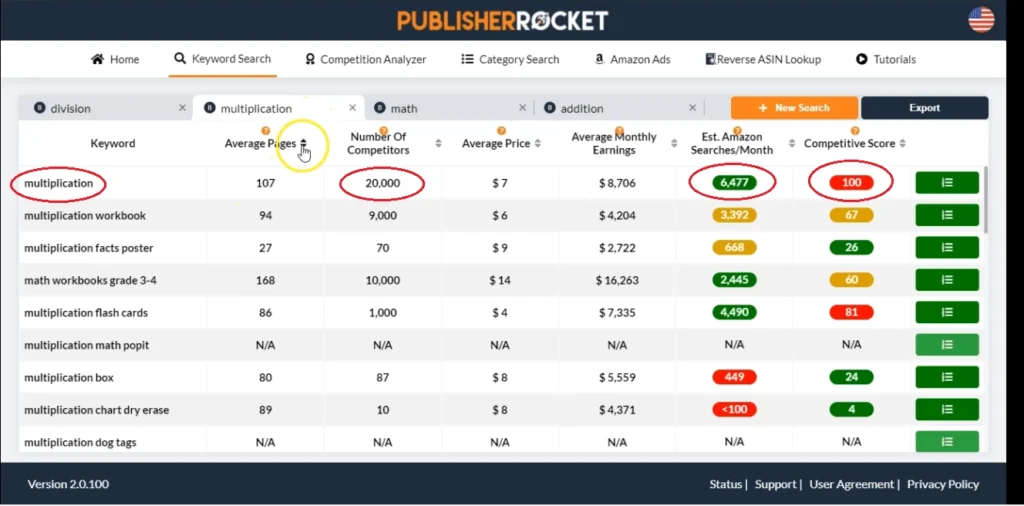
The first thing I noticed was how simple the workflow is. After selecting Paperback as the book format, I entered a single seed keyword: “multiplication.”
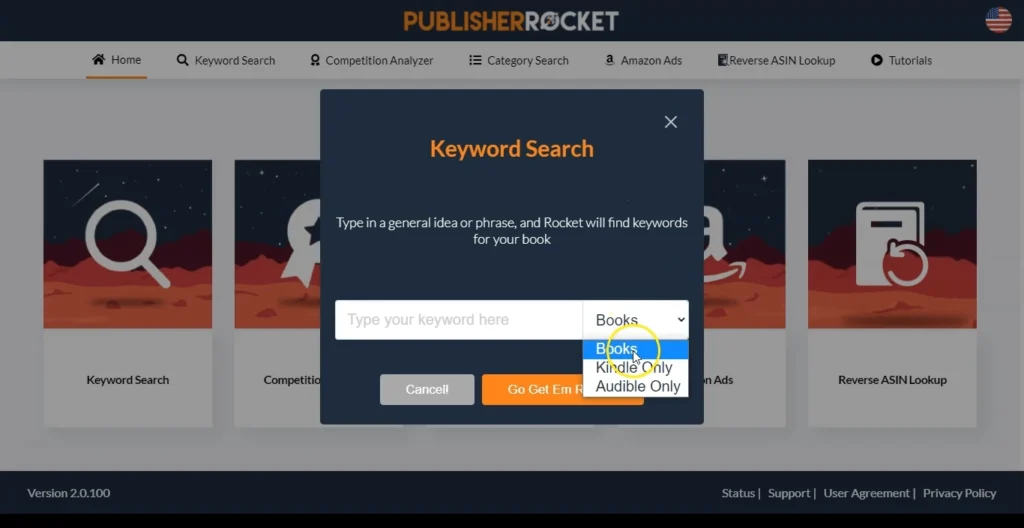
From there, Publisher Rocket generated dozens of related keyword ideas along with useful data like estimated searches, competition, average price, estimated monthly earnings, and competitive score.
The keyword “multiplication” on its own showed 20,000 competitors and a competitive score of 100. Translation: everyone is fighting over that word, and a new title has almost no shot at breaking through on it alone.
✨I have also written a whole blog post about creating Math Workbooks for Amazon KDP, you can read my review of Math Worksheets Generator here.
Why the Obvious Keyword Is Usually the Wrong One
This is the part most people skip. They see a keyword with huge search volume and assume that means opportunity. In reality, high volume almost always comes with high competition, and single, generic words like “multiplication” or “math workbook” are the most fought over real estate on Amazon.
The move isn’t to avoid competitive words entirely. It’s to use them as raw material, then sort through the longer, more specific variations that come out of the same search.
Sorting for the Sweet Spot
Once the keyword list populates, you can sort by pages, competitors, price, earnings, or estimated searches. I sort by competitive score first, then cross check that against monthly searches, because a keyword with zero competition and zero searches isn’t an opportunity. It’s a dead end.
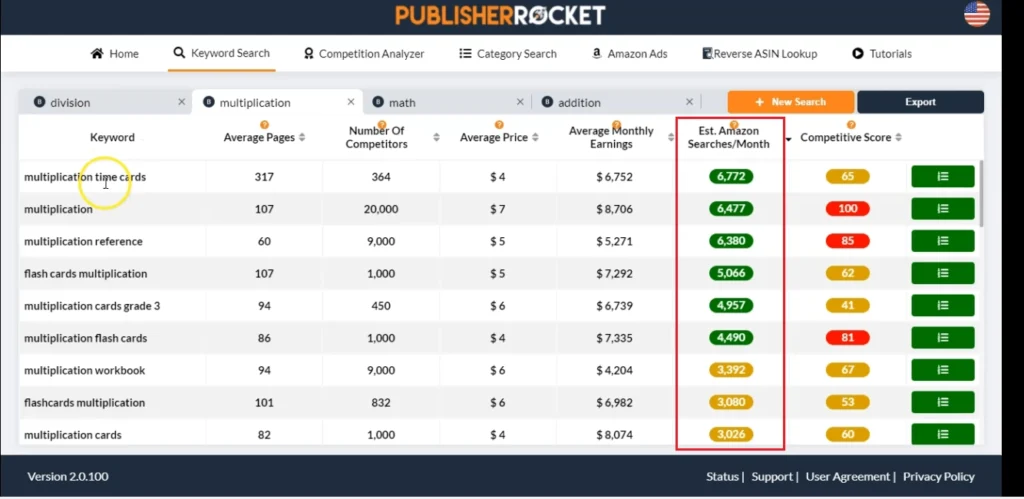
A few KDP Niches from this search stood out:
Multiplication time test 0 to 12: around 900 competitors, a competitive score of 11, and 371 estimated monthly searches. That’s a workable gap.
100 multiplication facts: under 1,000 competitors, a competitive score of 12, and 539 estimated searches. Also solid.
Multiplication workbook with tricks: 826 competitors, a competitive score of 5, decent average earnings, low search volume but low competition to match.
None of these are viral, overnight hits. What they are is realistic entry points, keywords where a well made book actually has room to rank instead of getting buried under 10,000 other listings.
👉 Related Post: How I Made $12,000+ with This Simple Math Book Tool
Checking Who You’d Actually Be Competing With
Finding a decent keyword is only half the job. The competition analyzer shows you the books currently ranking for it, including cover, category, author, page count, whether the keyword is in the title, and estimated daily and monthly sales.
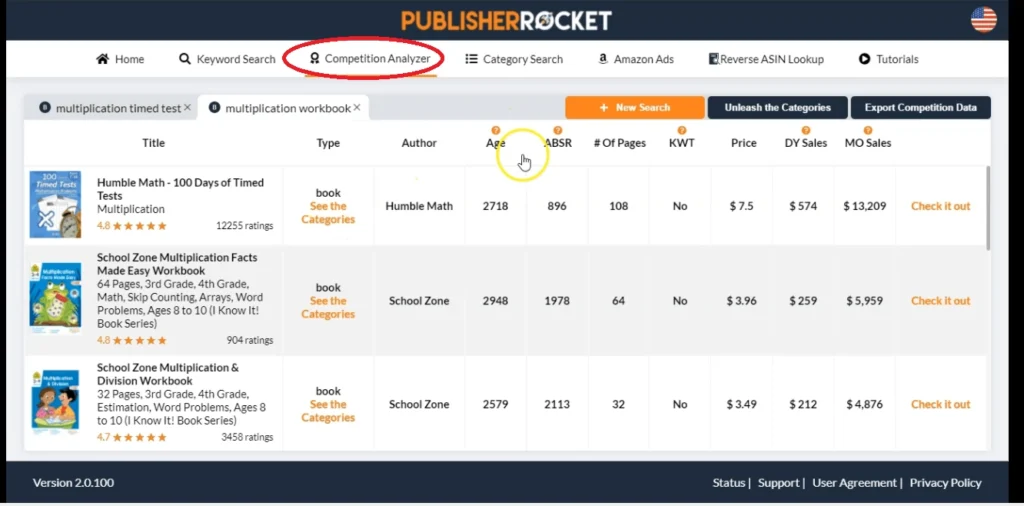
When I ran this on “multiplication workbook,” none of the top ranking books had the exact keyword in their title. That’s a signal. If established books are ranking without even targeting the phrase directly, there’s an opening for a book that does.
Some of those top books were independently published with hundreds of reviews and steady sales in the low thousands per month. Others were from large publishing brands, which tells me the category has real demand, not just a lucky handful of niche listings.
Next Useful Post for You: Publisher Rocket vs Titans Pro: Which Is Better for KDP?
How I’d Use this Data
Once I’ve got a shortlist of low competition, decent volume keywords, I don’t just pick one and stop. I use them for the book title and subtitle where it makes sense, and I fold the rest into the backend keyword fields so the book shows up for searches I’m not directly targeting in the title.
I also export the analyzed list so I have a record to come back to later, since niche competition shifts over time and today’s low competition keyword can fill up in a few months.
Check out Amazon KDP Quick Start Guide
How to Self-Publish a Book on Amazon – Step-by-Step Guide for Beginners!
Final Thoughts
After testing Publisher Rocket for the first time, I can see why it’s become one of the most recommended tools in the Amazon KDP community.
What impressed me most wasn’t that it promised to find “winning niches.” It doesn’t. Instead, it helps you make more informed decisions by showing real data about search demand and competition before you invest time creating a book.
Will it guarantee success? Of course not.
Publishing on Amazon KDP still requires quality content, good covers, and patience.
But if it helps you avoid spending weeks creating a book for a keyword that’s already overcrowded, that’s a huge advantage.
For me, it’s another useful tool to add to my publishing workflow, and I’m looking forward to using it more in future niche research.
If you’d like to see this process from start to finish, I’ve embedded my complete Publisher Rocket walkthrough below. In the video, I show the exact keyword research process I used, explain how I evaluate competition, and share the keywords that caught my attention during my first test.
If you’re interested in trying Publisher Rocket yourself, you can also check it out using my affiliate link below. If you decide to purchase through it, I may earn a small commission at no additional cost to you.
Thanks for reading:)
Talk soon,
Subha
Continue reading and learning…
My Recommended KDP Masterclass 2026 💡
KDP Masterclass By Self Publishing Titans
I absolutely love this Masterclass because it’s one of the most up-to-date and practical KDP courses available. The creators aren’t just teachers — they’re real KDP publishers who’ve earned over $300K in book royalties! 📚 I personally took this class and noticed a steady increase in my KDP sales over time. If you’re serious about growing your publishing business in 2026, this course is a total game changer.