How I Started Selling Digital Products on Gumroad: My Beginner Case Study
Last updated on October 14th, 2026 at 03:16 pm
How I created my first digital product, validated the idea with a freebie, and eventually turned Gumroad into another income stream.
When I created my first digital product on Gumroad in April 2020, I wasn’t trying to build a huge digital-product business. I simply noticed a problem my audience had and created a very simple solution.
That first product was only a one-page KDP book interior template. It wasn’t impressive or complicated, but it taught me one of the most important lessons I’ve learned about digital products: you don’t need to solve every problem. You need to solve one specific problem for one specific person.
I just found one problem my potential customers were facing and created a solution for that. As, I was creating videos about self-publishing books on Amazon KDP, the most common problems my audience was facing include;
- how find niche ideas
- how to find low-competition keywords
- how to create book interiors
- how to create book covers
- how to publish/list books on Amazon
- and so on…
My audience that mostly included beginner self-publishers. They had a ton of pain points or problems that were actually the problems I faced myself when I first started self-publishing.
Now, here is the thing for a digital product you can’t solve all problems in a single eBook, Template or Guide. That mistake alone stops most beginners from ever launching their first product.
Therefore, I picked one person (my past-self) and decided to solve one problem for him (creating book interiors).
👉 If you’re a beginner and wondering what problem to pick or what kind of digital product to create first, I’ve put together a free Gumroad Starter Checklist that walks you through the exact steps. You can grab it here (free)
What Can You Sell on Gumroad?
Before I share more about my first digital product, Let’s have quick look at the type of products you can sell on Gumroad.
On Gumroad, you can sell a wide range of digital products that you potential customer can buy and download instantly on their cell phone, PC or laptop.
Below are a few most commons example of products you can create and sell as digital downloads:
- eBooks
- guides
- templates
- printables
- worksheets
- Canva templates
- design assets
- courses
- spreadsheets
- digital planners
- checklists
- prompts
Now here is the thing, You don’t need to create a 200-page eBook or 20hrs long video course. You can even sell one page template or one worksheets, 1 audio file or just 1 video lesson. My first product was literally a one-page PowerPoint template.
You can sell anything and everything that people can download digitally. So, the opportunities for digital products are endless.
👉 Want to create and sell digital products fast? I put together a 50-page PDF guide sharing everything I have learned since 2020. It’s super practical, and people are loving it. I call it The 1-Hour Gumroad Guide; you can learn more about it here.
How I Found My First Digital Product Idea
When I was trying to figure out what my first digital product should be, I didn’t start by asking, “What can I create that might sell?” Instead, I looked at the people who were already following my content and paid attention to the problems they were struggling with.
At that time, I was creating videos about self-publishing books on Amazon KDP. My audience was mostly beginner self-publishers, and many of them were dealing with the same challenges I had faced when I first started.
They wanted to know how to find niche ideas, discover low-competition keywords, create book interiors and covers, and publish their books on Amazon.
That gave me an important clue.
Their questions were potential product ideas.
But there was another lesson I learned along the way. A digital product doesn’t have to solve every problem your audience has. In fact, trying to solve everything at once can make your first product much harder to create.
So I decided to make things much simpler.
I picked one person: my past self, a beginner who was struggling to create book interiors.
Then I picked one problem: creating a simple KDP book interior.
That became the starting point for my first digital product.
The simple framework I used
If you’re trying to come up with your own digital product idea, you can use the same approach:
1. Think about the audience you already understand: This could be people who follow your YouTube channel, read your blog, participate in a community, or have the same type of problem you have experienced yourself.
2. Look for repeated problems: Pay attention to the questions people ask you. Look at comments, emails, Facebook groups, search results, and conversations. Repeated questions can be valuable clues.
3. Pick one specific problem: Don’t try to create the ultimate guide that solves ten different problems. Your first product can be much simpler.
4. Create the simplest useful solution: It could be a template, checklist, guide, worksheet, spreadsheet, or short tutorial. The format matters less than whether it actually helps someone solve the problem.
For me, that solution turned out to be a one-page PowerPoint template for a KDP book interior.
It was incredibly simple, but that was actually an advantage. I could create it quickly, give it to people who needed it, and see whether there was genuine interest before spending weeks creating a much larger product.
That experience taught me one of the most useful lessons I’ve learned about digital products:
Don’t start by asking what product you can create. Start by asking what problem you can solve for one specific person.
Once you have that problem, the product idea often becomes much easier to see.
My First Ever Digital Product
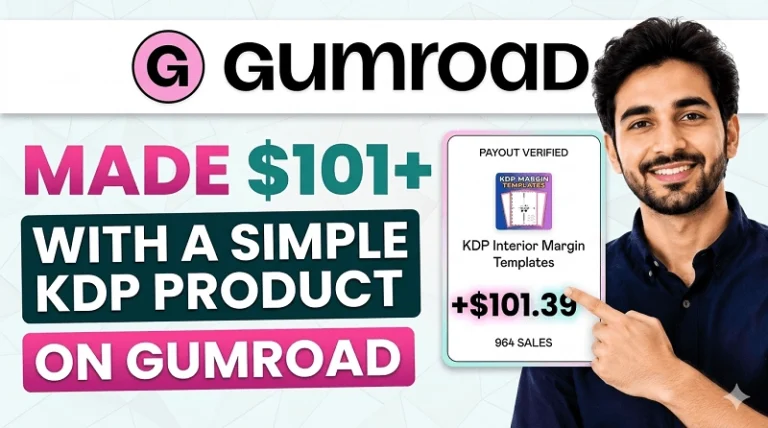
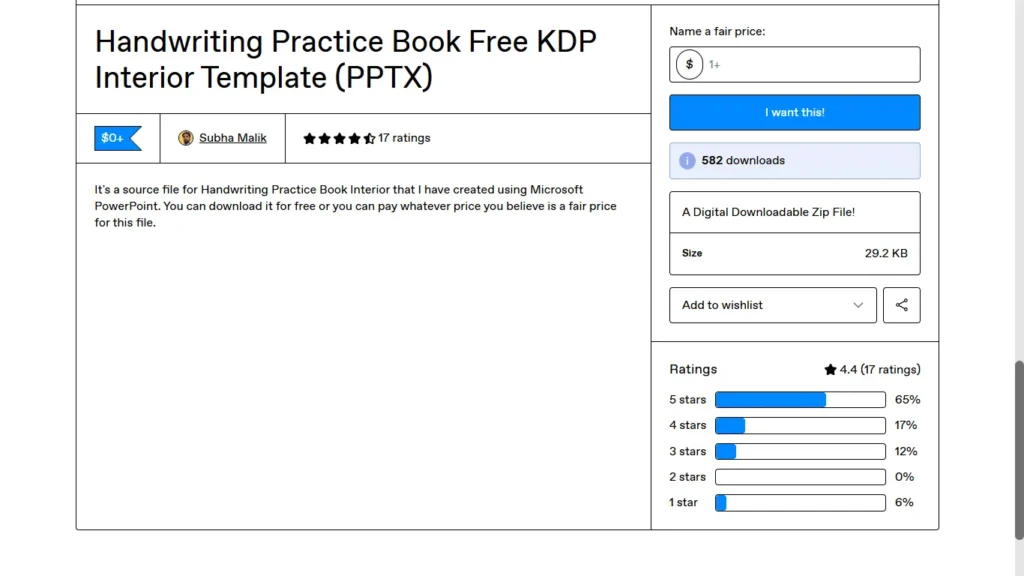
My first ever digital product that I started selling on Gumroad (back in April, 2020) was a KDP book interior template. It was just 1-page PowerPoint template.
🎁 Download 15 FREE KDP Interior Templates
Save time and create beautiful low-content books faster with these 15 ready-to-use KDP interiors — completely free! Perfect for journals, planners, and activity books.
It was a handwriting practice book interior which was a relatively low-competition KDP niche back then. Now, most beginner self-publishers either don’t know how to create book interiors or they may not have time to learn the process.
Therefore, they are actively searching for ready to download book interiors and/or how to video tutorials on YouTube. Keeping this in mind, I recorded a step-by-step video tutorial teaching them how to create a handwriting practice page.
When I published the video tutorial on my YouTube Channel, I also uploaded the PowerPoint template on Gumroad as a freebie for my YouTube viewers.
This same free KDP template has 582 downloads for so far and also made me $8 in revenue. More importantly, it validated demand and built trust with my audience.
👉 Related Post: Gumroad Earnings in 2025: Views, Sales, and Income Report
How to Create a Digital Product
Once you have identified a specific problem to solve, the next step is turning that solution into a useful digital product.
One mistake beginners often make is thinking their first product needs to be large or complicated. My experience was very different. My first Gumroad product was just a one-page PowerPoint template.
The goal wasn’t to create the biggest product possible. It was to create something that solved a specific problem for a specific person.
Start Small
Before creating your product, ask yourself:
What is the simplest useful solution I can create for this problem?
Depending on your audience, it could be a template, checklist, guide, worksheet, ebook, spreadsheet, printable, or short tutorial.
You don’t need to spend weeks creating a huge product before finding out whether people actually want it.
In my case, I knew beginner self-publishers were struggling with KDP interiors, so I created a simple template that could help them get started.
Test Before You Go Bigger
If you’re unsure about an idea, start with a simple version and put it in front of your target audience.
You can offer a small free resource, create a tutorial around the problem, or share the product with people who are already interested in that topic.
Then pay attention to the response.
Are people downloading it? Asking questions? Sharing it? Coming back for more?
Those signals can help you decide whether the idea deserves a larger paid product.
That’s what happened with my first KDP template. It eventually received 582 downloads and generated $8 in revenue. The money wasn’t the biggest takeaway. The downloads showed me that people were interested in the solution.
Don’t Aim for Perfect
Your first product is also a learning experience. You’ll learn about your audience, their problems, pricing, product formats, and what they actually value.
So instead of trying to create the perfect digital product from day one, focus on creating something simple, useful, and relevant to a real problem.
My basic approach is:
Find a problem → Create a simple solution → Test it → Improve it → Sell it
I’ll go into the more detailed, practical process of creating and launching a digital product in my 1-Hour Gumroad Guide. The goal of this article is simply to help you understand the strategy before you start creating.
How to Sell Digital Products on Gumroad
Once you’ve created your digital product, Gumroad makes the technical side of selling it relatively simple. You can create a product page, upload your digital files, set a price, and share your product link with potential customers.
But here’s something important I learned from my own experience:
Creating a Gumroad product is not the same thing as selling a Gumroad product.
The technical setup is usually the easy part. The harder part is getting your product in front of the right people and giving them a reason to buy it.
That’s why I wouldn’t recommend spending all your time trying to make a perfect Gumroad product page before you’ve even figured out where your customers will come from.
Instead, think about the complete process:
Find a problem → Create a useful solution → Put it on Gumroad → Get it in front of the right audience → Improve based on what you learn
When I published my first product, I already had an audience of beginner self-publishers through my YouTube content. I created a tutorial around a problem they were facing and offered my related KDP template as a resource.
That gave me a much better starting point than simply uploading a product to Gumroad and hoping someone would discover it.
My first template eventually received 582 downloads and generated $8 in revenue. The money wasn’t the important part at that stage. The downloads showed me that people were interested in the solution.
Want the Detailed Step-by-Step Process?
If you’re completely new to Gumroad and want to know exactly how to go from product idea → finished digital product → published Gumroad product, I’ve put together my 1-Hour Gumroad Guide to walk you through the process in much more detail.
👉 Get the 1-Hour Gumroad Guide →
The free article you’re reading gives you the overall strategy. The guide is for people who want the practical step-by-step process without having to figure everything out themselves.
👉 Read the Full Step By Step Guide with Screenshots Here: How to Sell Digital Products on Gumroad (Step-by-Step Guide)
My Biggest Lesson From Selling Digital Products
After creating and selling digital products, one of the biggest lessons I’ve learned is that you don’t need to start with a complicated business or dozens of products.
Start with one audience, one problem, and one useful solution.
My first product was tiny. But it helped me validate an idea, understand my audience better, and eventually create more digital products.
If you’re just starting out, don’t spend months trying to build the perfect product.
Find a real problem. Create a simple solution. Put it in front of the right people. Then let the response guide your next step.
And if you want the practical step-by-step process for turning an idea into a digital product and getting it published on Gumroad, that’s exactly what I cover in my 1-Hour Gumroad Guide.
Talk soon,
Subha
Frequently Asked Questions About Selling on Gumroad
1. Is Gumroad free to use for selling digital products?
Yes, Gumroad is free to set up and start using. Instead of a monthly subscription fee, Gumroad operates on a flat percentage fee model per transaction (currently taking a flat 10% fee on sales), meaning you only pay when you actually make a sale.
2. How are digital products delivered to buyers?
Once a customer completes their purchase, Gumroad handles the fulfillment entirely through automated instant delivery. The buyer receives an email containing a secure download link immediately after checkout, allowing them to access their files (PDFs, templates, or zips) instantly on their computer, tablet, or smartphone without any manual effort on your part.
3. What types of digital products sell best?
While ebooks and simple PDF guides are popular, creators are finding massive success selling a wide variety of digital downloads, including:
- Templates: Notion templates, Canva template bundles, PowerPoint and KDP book cover templates.
- Worksheets & Printables: Educational math workbooks, coloring pages, and classroom anchor charts.
- Digital Assets: Spreadsheets, custom prompts, code snippets, and 3D models.
4. How does Gumroad compare to alternatives like Stan Store?
While platforms like Stan Store are built heavily around a mobile-first link-in-bio experience tailored for social media creators, Gumroad functions more like an all-in-one lightweight digital marketplace and storefront. Gumroad excels if you want deep product customization, flexible “pay what you want” pricing tiers, automated license key generation, and built-in discovery features for digital downloads.
My Recommended KDP Masterclass 2026 💡
KDP Masterclass By Self Publishing Titans
I absolutely love this Masterclass because it’s one of the most up-to-date and practical KDP courses available. The creators aren’t just teachers — they’re real KDP publishers who’ve earned over $300K in book royalties! 📚 I personally took this class and noticed a steady increase in my KDP sales over time. If you’re serious about growing your publishing business in 2026, this course is a total game changer.