Cut and Paste Worksheets Generator (Full Overview + My Bonus)
A simple tool to create kids worksheets and KDP books faster
I recorded a quick first look video of a new KDP tool called Cut & Paste Worksheets Generator, and now that it’s officially live, I want to break it down properly here.
I’ve already tested it and created multiple pages within minutes using the built-in templates.
Watch the first look video below:
🎁 Download 15 FREE KDP Interior Templates
Save time and create beautiful low-content books faster with these 15 ready-to-use KDP interiors — completely free! Perfect for journals, planners, and activity books.
👉 Get the software here + my bonus
Note: The templates and design sections may be slightly different in the final software, as I recovered this video before launch and the software was still in the development mode.
What This Software Actually Does
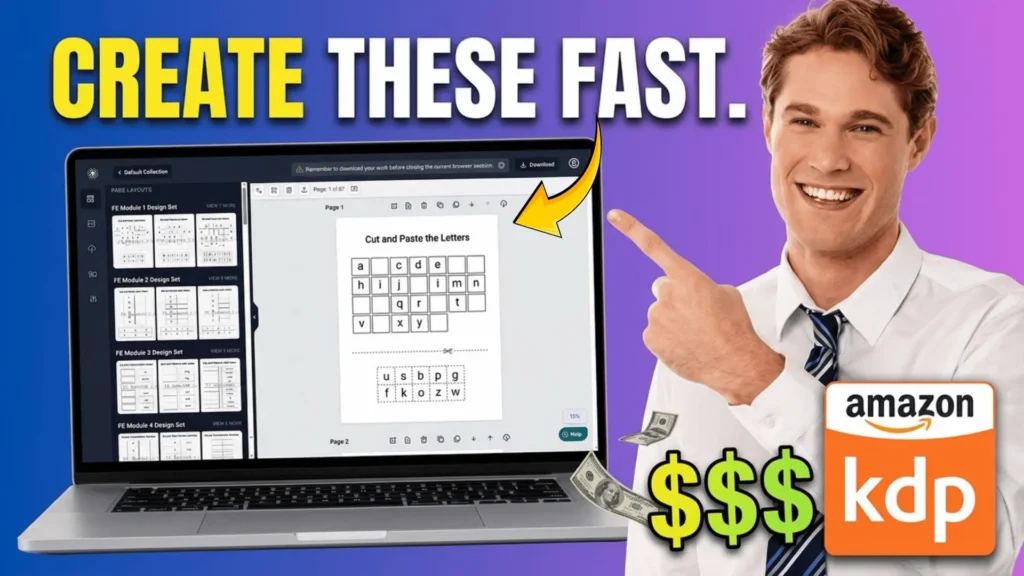
This tool helps you create cut and paste worksheets and activity books for kids very quickly.
Inside, you get ready-made templates for things like:
- Cut and paste letters
- Letter matching
- ABC order
- Number matching
- Build a clock activities
- Addition, subtraction, multiplication, division
- Word scramble and rhyming words
- Word identification
- Skip counting and “find the next”
These are not just basic designs. There are multiple variations for each type, so you’re not creating the same boring pages again and again.
You can turn these into:
- KDP workbooks
- Etsy printables
- Teachers Pay Teachers resources
- Or sell them on your own site
How Fast You Can Create Pages
What stood out to me is how quickly you can generate pages.
I created multiple worksheet pages in just a few minutes using different templates like:
- Cut and paste letter
- Letter match
- Number matching
- ABC order
Each one looks clean and ready to publish.
Customization (This Is Where It Gets Useful)
You’re not stuck with fixed templates.
You can easily:
- Switch between uppercase and lowercase letters
- Change rows and spacing
- Adjust column layout
- Increase or decrease font size
- Show or hide borders
- Change stroke width
Everything is done with simple controls, so you don’t need design skills.
👉 Related Post: How I Made $12,000+ with This Simple Math Book Tool
Inside the Modules (What You Get)
The front-end version already includes a lot.
You get multiple modules, each focused on a different type of worksheet:
- Letters & Letter Matching
- ABC Order Activities
- Number Matching
- Clock Building Worksheets
- Addition (16 templates)
- Subtraction (multiple designs)
- Multiplication
- Division (around 16 templates)
- Mixed Math (addition + subtraction)
- Word Unscramble
- Rhyming Words
- Word Identification
- Skip Counting & Find the Next
There are up to 12 modules, each with different templates.
So even with just the front-end, you can create a lot of unique books.
Niche Potential (This Is Important)
I quickly checked the demand.
- “Cut and paste worksheets” gets around 2,900 monthly searches on Google
- On Amazon, there are multiple keyword variations with steady demand
From what I can see, this niche is still not saturated with high-quality books.
That means you can:
- Create better-looking books
- Publish faster
- And compete with stronger products
Where You Can Sell These
You’re not limited to just Amazon.
You can use these worksheets for:
- Amazon KDP
- Etsy printables
- Teachers Pay Teachers
- Your own website
That flexibility makes this tool more useful long term.
Download Options
Once your pages are ready, you can download them as:
- PNG
- JPG
There are also upgrades that may include formats like PowerPoint.
My Bonus (Only If You Use My Link)
If you decide to get this tool through my link, I’ll give you:
👉 My Complete Amazon KDP Course (FREE)
(Current value: $27)
Inside the course, I show you:
- How I find profitable niches
- How I design covers that actually get clicks
- Step-by-step publishing process
- How to start getting consistent sales
This is the exact system I use.
Final Thoughts
This is one of those tools that can save a lot of time if you’re serious about KDP or printables.
Instead of creating everything manually, you can:
- Generate pages faster
- Test more ideas
- Publish more books
If you combine this with a proper niche strategy, it can work really well.
If you have any questions, feel free to reach out. I’ll also be sharing more examples and ideas using this tool soon.
Talk soon,
Subha
My Recommended KDP Masterclass 2026 💡
KDP Masterclass By Self Publishing Titans
I absolutely love this Masterclass because it’s one of the most up-to-date and practical KDP courses available. The creators aren’t just teachers — they’re real KDP publishers who’ve earned over $300K in book royalties! 📚 I personally took this class and noticed a steady increase in my KDP sales over time. If you’re serious about growing your publishing business in 2026, this course is a total game changer.