How I Made $14,000 Selling Math Worksheets on Amazon KDP — With One Simple Tool
How a simple tool turned into a passive income machine on Amazon KDP, Etsy, and Teachers Pay Teachers
You don’t need design skills. You don’t need publishing experience. You don’t even need a teaching degree.
What you need is a repeatable system — and one tool that does the heavy lifting for you.
I’ve generated over $14,000 in Amazon KDP royalties selling math worksheets. The same content now sells on Etsy and Teachers Pay Teachers too. And the entire workflow starts with a single piece of software called Math Worksheets Generator.
Here’s exactly how it works — and how you can replicate it.
Why Math Worksheets Are a Goldmine for Passive Income
Educational content is one of the most durable digital product categories online. Teachers need classroom materials every school year. Parents hunt for supplemental practice. Homeschool families need structured, grade-aligned curriculum.
Math worksheets hit a particular sweet spot:
- They’re searched by specific grade level and operation (e.g., “3rd grade multiplication worksheets”)
- Buyers are ready to purchase — they have an immediate need
- The content doesn’t go stale the way trend-based products do
- You create it once and it sells repeatedly across multiple platforms
The market is competitive, yes — but the demand is enormous and consistent. A well-positioned worksheet pack can earn royalties for year.
How I Quickly Find Profitable KDP Niche Ideas Using Titans Pro
You may like this post where I shared a simple yet effective way I use to find low-competition, profitable KDP niche ideas fast!
The Three Platforms Where Math Worksheets Sell Best
Before diving into the tool, it helps to understand where the money actually comes from:
1. Amazon KDP (Kindle Direct Publishing) Turn your worksheets into full workbooks of 100+ pages. Amazon prints and ships every order on demand. You earn royalties without ever touching inventory. This is the highest-earning platform in my experience.
2. Etsy Sell digital downloads. A buyer pays, they immediately download a PDF. Zero fulfillment, zero overhead. Etsy’s search is heavily used by parents and teachers looking for printables.
3. Teachers Pay Teachers A dedicated marketplace for educators. Teachers are accustomed to buying curriculum resources here, and quality math content sells consistently.
The beauty of this model: you create the content once and distribute it across all three platforms.
How Math Worksheets Generator Works (Step-by-Step)
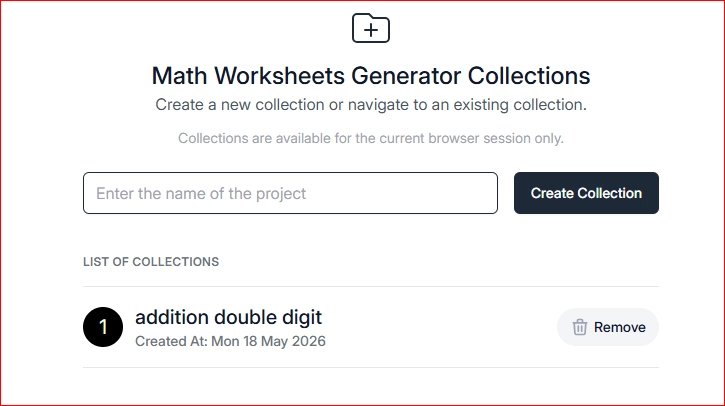
The Math Worksheets Generator is organized around collections. You start by creating a new collection, something like “Addition Double Digit,” and then you’re dropped into a page editor.
Step 1: Create a New Collection
Name it something descriptive like “Double Digit Addition” or “3rd Grade Multiplication.” You’re immediately dropped into a page editor.
🎁 Download 15 FREE KDP Interior Templates
Save time and create beautiful low-content books faster with these 15 ready-to-use KDP interiors — completely free! Perfect for journals, planners, and activity books.
👉If you prefer, you can watch a video tutorial here
Step 2: Configure Your Page Settings
Once you click on the collection, it opens a blank document. From the settings tab, you can choose your trim size. For most children’s educational books, I use 8.5 x 11, then I also setup things like page number options, margins and finally hit update.
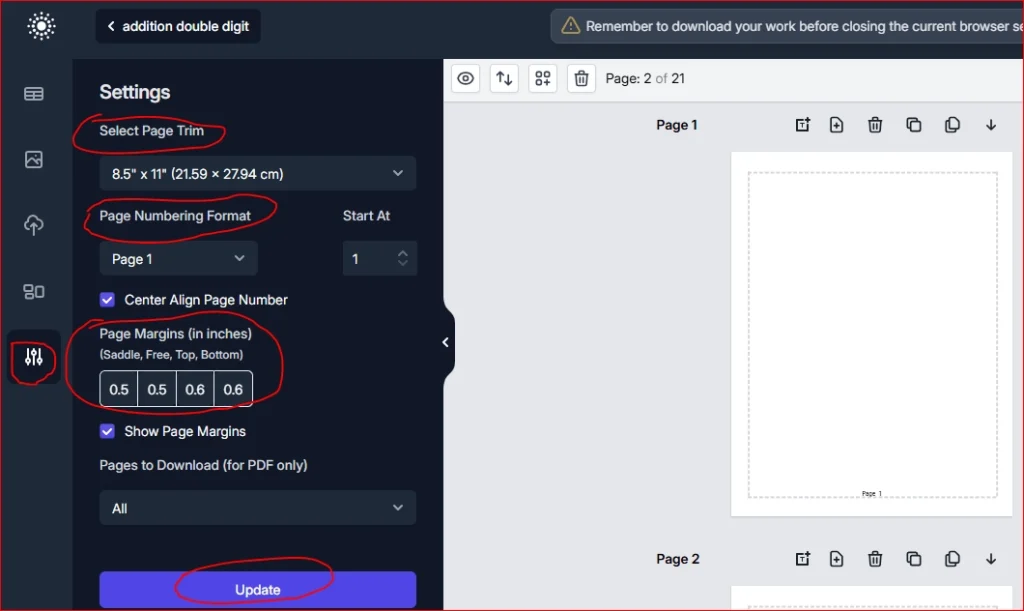
If you’re building for Amazon KDP, you’ll want to keep that in mind since it’s the most common format for workbooks and printables.
Step 3: Add a Title and Choose a Template
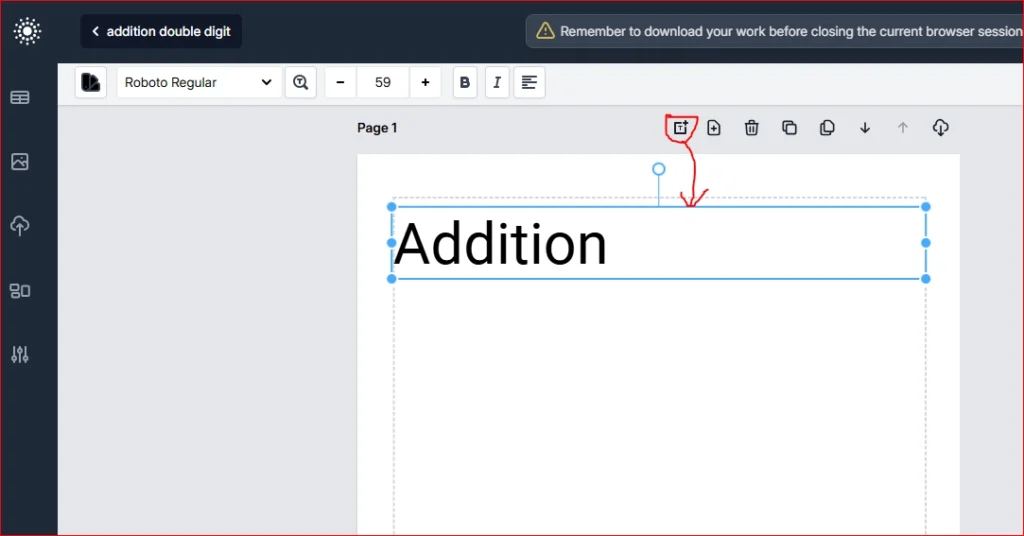
Adding a title is simple. You click the text tool, type your heading, adjust the font size, center it, and position it within the page margins. Then you go to the math worksheet templates.
The tool includes templates for:
- Addition
- Subtraction
- Multiplication
- Division
- Step multiplication (Pro version)
Select your template and a problem grid generates automatically.
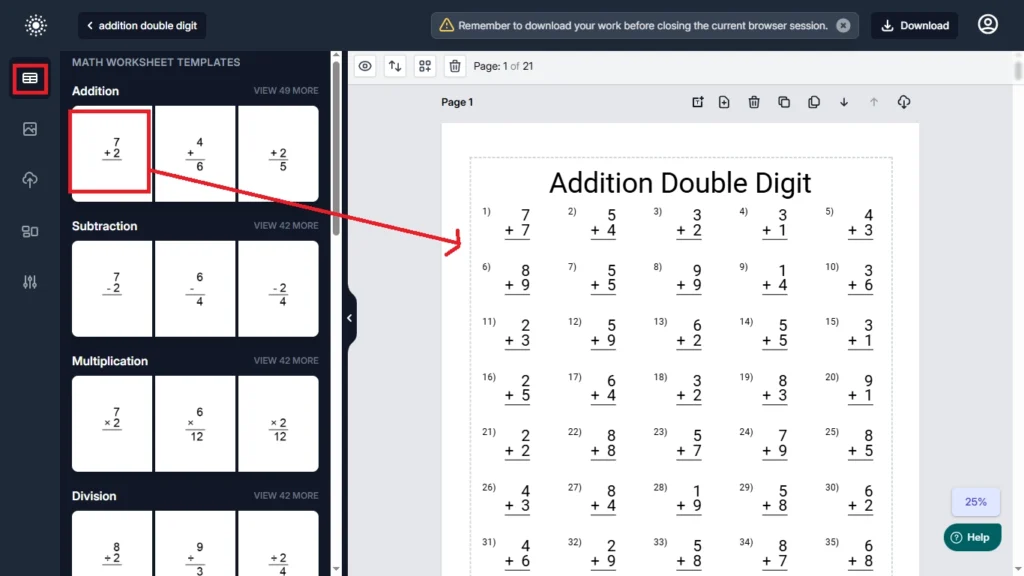
Step 4: Customize the Problem Grid
Once the grid appears, a settings panel opens on the left. Here you control:
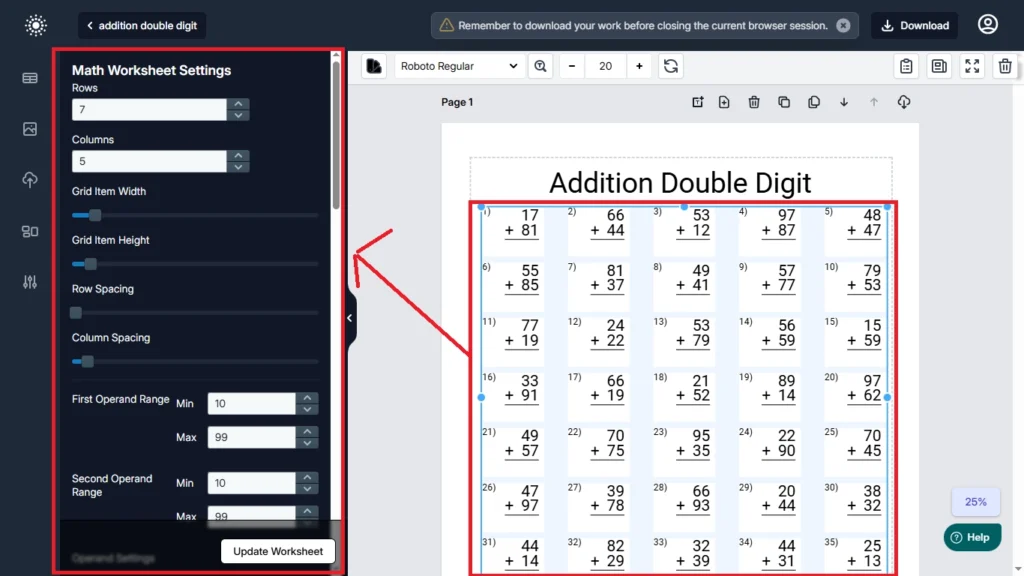
- Row and column count — I use 5 columns × 7 rows for a clean 35-problem page
- Operand range — For double-digit addition, set this from 10 to 99
- Grid item width and height
- Spacing between rows and columns
The tool generates unique problems within your operand range every time you clone or refresh a page.
I went with 5 columns and 7 rows, that works best for a 35-problem page. For double-digit addition, you can set the operand range from 10 to 99. The tool generates unique problems within that range every time you clone or refresh the page.
Step 5: Clone Pages to Build Your Pack Fast
This is where the real efficiency kicks in.
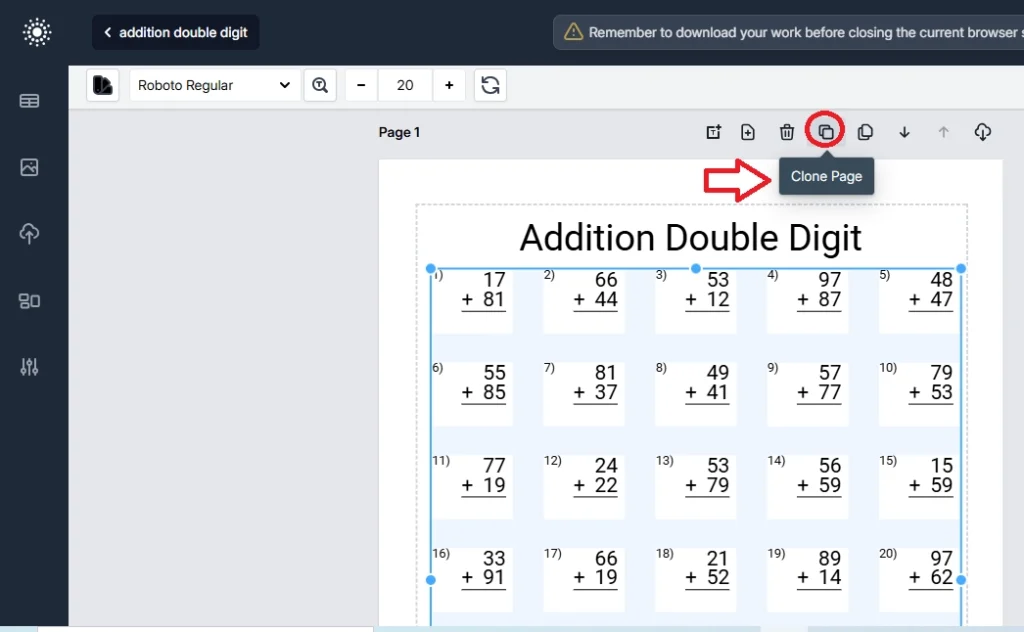
Once your first page looks exactly right, click “Clone Page.” A new page is generated instantly with a completely different set of problems — same layout, fresh content.
This is where the real efficiency kicks in.
Once your first page looks exactly right, click “Clone Page.” A new page is generated instantly with a completely different set of problems — same layout, fresh content.
Step 6: Generate Answer Keys Automatically
When your worksheet pages are done, click “Generate Solutions.” The tool creates a complete answer key section matching every worksheet automatically.
Once you’ve built your worksheet set, you click “Generate Solutions” and the tool automatically creates answer key pages to match every worksheet.
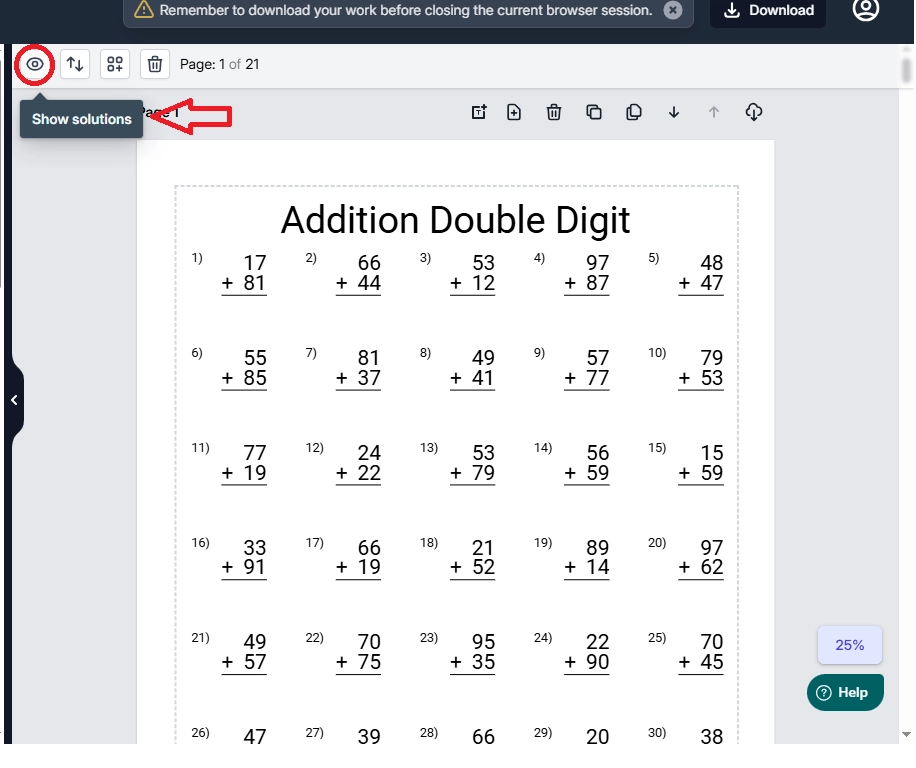
No manual checking. No room for errors.
Step 7: Export as PDF
One click exports the entire collection — worksheets and answer keys — as a clean, print-ready PDF.
Check out Amazon KDP Quick Start Guide
How to Self-Publish a Book on Amazon – Step-by-Step Guide for Beginners!
What to Submit on Each Platform
For Etsy and Teachers Pay Teachers: A 20-page worksheet pack plus answer key pages is typically enough. Buyers on these platforms want ready-to-print materials. A professional layout with a clean answer key is exactly what converts.
For Amazon KDP: Go bigger. Build workbooks of 100+ pages covering multiple operations. The higher page count creates a more substantial product, supports a higher price point, and performs better in Amazon’s algorithm.
The process is identical for each operation — just change the template and operand range, clone your pages, generate solutions, and export.
Writing Your Listing Copy (The 10-Minute Shortcut)
Once the PDF is ready, open ChatGPT or Gemini and upload a few pages as images alongside the PDF.
Ask it to generate:
- A listing title optimized for the platform
- A subtitle
- A full product description
- Relevant tags and keywords
This takes roughly 10 minutes and produces copy that matches what teachers and parents are actually searching for — because the AI is analyzing your real content, not guessing.
For Etsy and Teachers Pay Teachers, also generate mockup images with AI. A polished, well-lit thumbnail makes a significant difference in click-through rates.
Why This Works
Educational content has reliable, consistent demand. Teachers need classroom materials every school year. Parents look for supplemental practice worksheets. Homeschool families need structured curriculum. That demand does not go away.
Math worksheets in particular sit in a sweet spot: they’re needed, they’re practical, and buyers are actively searching for them by grade level and operation type. The competition exists, but so does the market.
The tool handles the hard part, which is generating endless unique content, so you’re not staring at a blank page trying to invent problems manually. You’re focused on layout, organization, and getting the PDF ready to publish.
Getting Started with Math Worksheets Generator
If you want to try Math Worksheets Generator yourself, there’s a front-end version that includes addition, subtraction, multiplication, and division templates.
The Pro version adds bulk cloning, bulk deletion, color options, and more advanced template types like step multiplication. Either version is enough to start building your first worksheet pack.
Key Takeaways
- Math worksheets sell consistently across Amazon KDP, Etsy, and Teachers Pay Teachers
- Math Worksheets Generator automates problem creation, cloning, and answer key generation
- A 20-page Etsy pack takes under an hour to produce; a full KDP workbook takes longer but earns more
- AI tools like ChatGPT handle listing copy in about 10 minutes
- This is a repeatable, scalable system — not a one-time project
Thanks for reading:)
Talk soon,
Subha
Affiliate disclaimer: This story may have affiliate links and I may earn commissions at NO extra cost to you.
Read more from Subha Malik
🧮 Create Math Workbooks in Minutes
I’ve been using Math Worksheets Generator to create math workbooks super fast — and it’s a total game changer! So far, I’ve created 17 books (16 live on Amazon) and made over $14,000 in royalties.
The vendor recently introduced a monthly subscription, but the lifetime deal is still available — and it might be discontinued soon.
Get Math Worksheets GeneratorAffiliate disclaimer: I may earn a small commission if you purchase through my link — at no extra cost to you.