Best KDP Tools for Beginners (2026): My Exact Stack to Start Making Money
I remember when I started publishing on Amazon KDP back in 2017, I was doing everything manually and it took me a lot of time and effort. But things have really changed now. There are dozens of KDP tools and resources now available that can speed up the book creation process a lot.
However, that massive shift has created a brand new problem: total overwhelm.
If you are just starting out today, trying to figure out which KDP software is actually worth your time is exhausting. Every YouTube tutorial pushes a different expensive subscription, making it feel like you need a massive budget just to get your first book live.
Let me stop you right there—you don’t.
In this post, I am going to cut through the noise and share the exact, lean tool stack I personally use right now. Whether you are formatting a simple journal or designing a children’s coloring book, I promise you only need these few smart tools to start making money. No fluff, no distractions – just what actually works.
🎁 Download 15 FREE KDP Interior Templates
Save time and create beautiful low-content books faster with these 15 ready-to-use KDP interiors — completely free! Perfect for journals, planners, and activity books.
Why Choosing the Right Tools Matters
Let’s be honest: your time is valuable. Trying to manually figure out Amazon’s algorithm or struggling with clunky design software is the fastest way to burn out before you even begin. The right tools completely remove the guesswork.
They tell you exactly what niches are hungry for new books, speed up your creation process, and make designing your interiors incredibly smooth – even when you need to make specific formatting choices, like intentionally leaving out page numbers so your full-page illustrations really pop.
Having a solid toolkit means you spend less time stressing and more time actually publishing.
The right tools are going to do three things for you:
- Save you hours of time: No more manually guessing what people are searching for.
- Help you pick profitable niches: You will know exactly which book ideas will actually sell.
- Make design and publishing a breeze: Even if you have zero graphic design or writing background.
My biggest piece of advice: You only need a few smart tools, not dozens. Keeping things simple is the secret to avoiding burnout and actually getting your first book live.
Amazon KDP Tools for Beginners
Now that we know why having a smart setup is crucial, let’s look at the actual KDP tools that will get you there. When you are just starting out, it is tempting to sign up for every shiny new program the experts recommend.
Don’t do it! You really only need a handful of core tools to handle your keyword research, content creation, and interior design. Here is the exact, beginner-friendly lineup I rely on to take a book from a raw idea to a fully formatted, ready-to-publish file.
A. Keyword & Niche Research
Keyword and niche research isn’t just important—it is the absolute foundation of your KDP success. The days of just slapping any random book onto Amazon and hoping the passive income rolls in are over.
To actually make sales, you have to be highly strategic about what you create. You need to know exactly what your audience is searching for before you even start designing—like knowing there is a specific demand for a themed coloring book for kids ages 4-8 rather than just a generic art book. That targeted strategy is exactly where smart KDP keyword and niche research comes into play.
# 1- Titans Pro (Primary Recommendation)
If you have a little bit of budget, this is my top pick. It pulls Amazon search data directly and shows you exactly how much demand and competition a keyword has. It is incredibly visual and perfect for beginners who get confused by massive spreadsheets.
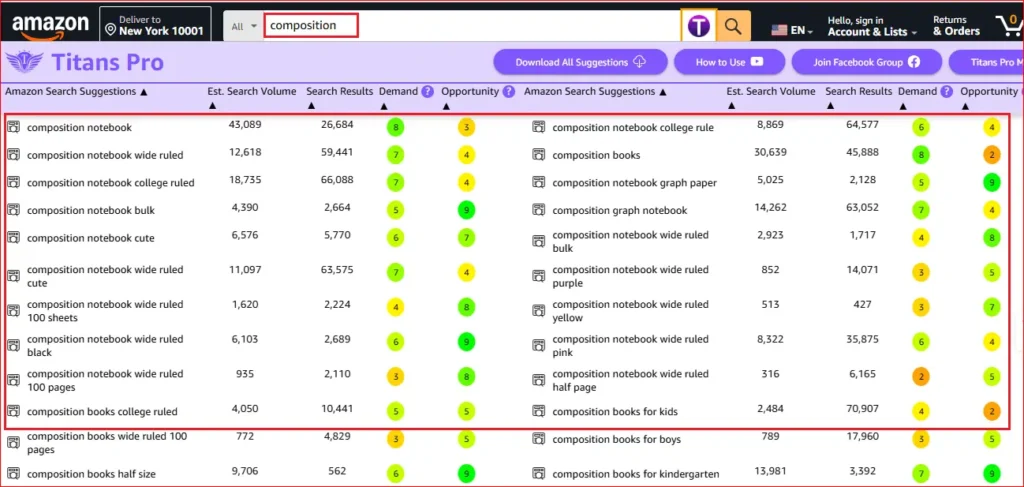
I’ve also published a detailed breakdown of Titans Pro—feel free to check it out below:
How I Quickly Find Profitable KDP Niche Ideas Using Titans Pro
You may like this post where I shared a simple yet effective way I use to find low-competition, profitable KDP niche ideas fast!
# 2 – Book Bolt
A great budget-friendly option, especially if you’re just getting started. Book Bolt makes it easy to create low- and medium-content books like journals, planners, and puzzle books, while also giving you built-in tools for keyword and niche research.
In many ways, it’s an all-in-one platform designed to simplify the entire KDP process for beginners. And the best part? You can try it out with a 3-day free trial before committing.
👉 Ready to test it out for yourself? Start your free 3-day trial and see how easy it is to create and publish your first book.
Or you can check out my post on How I Created a Full KDP Book Using Book Bolt in 60 Minutes.
# 3 – Free Alternatives
If your budget is zero, install the AMZ Suggestion Expander and DS Amazon Quick View Chrome extensions. They will help you see expanded search terms and book rankings directly on Amazon for free.
Pro Tip: Start with the free Chrome extensions to get a feel for how Amazon search works, and upgrade to a paid tool like Titans Pro once you are ready to take things seriously.
B. KDP Design Tool (Book Interior & Cover)
Below you will find some of my favorite tools for creating book interiors and book covers for Amazon KDP.
# 1- Canva (Free/Paid)
Canva is the absolute best beginner-friendly design tool on the internet. You can use it to design beautiful book covers, format your interior pages, and create stunning A+ content for your Amazon listings.
The free version is incredibly generous, though the Pro version gives you access to premium graphics and a magic resize tool that saves tons of time.
✨ Want to create a coloring book in Canva? I have also written a blog post on How to Use Canva for Kdp Low Content Books, in which I have shown a step-by-step process to create a simple coloring book for free!
# 2- Creative Fabrica
Think of this as a massive digital marketplace. If you don’t want to design everything from scratch, you can download premium fonts, stunning graphics, and even completely ready-made KDP book interiors. It is optional, but a massive time-saver.
You can try out Creative Fabrica for free using this link. But make sure change/customize the resources before uploading to Amazon KDP otherwise you may ending up creating duplicate content.
👉 Read more about The RIGHT Way to Use Creative Fabrica for KDP Low Content Books
C. AI Tools for Book Listing
Gemini / ChatGPT
AI has completely changed the KDP game. You can use these AI tool like ChatGPT or Google Gemini to brainstorm book ideas, outline your chapters, write compelling Amazon book descriptions, and even generate text for your interiors. It completely eliminates writer’s block and speeds up your productivity by 10x.
Free vs Paid Strategy
Start Free, Upgrade When Ready. You do not need to buy everything on day one. Here is the strategy I recommend:
Start Free
- Use Canva (Free) for all your designs.
- Use AMZ Suggestion Expander (Free) for basic niche research.
- Use the free versions of Gemini or ChatGPT for brainstorming.
When to Upgrade
Once you have published your first 2 or 3 books and understand the process, invest your first royalties into a dedicated research tool like Titans Pro or a design upgrade like Book Bolt. Let your business pay for its own upgrades!
My Exact Tool Stack
If I Were Starting Today…
If I lost everything and had to start my KDP business from scratch today, this is the exact, lean stack I would use:
1. Canva (Free/Pro): I use it mainly for book covers and formatting book interiors
2. Titans Pro: I use it a lot of finding low competition keywords and niche ideas.
3. Helium 10: In addition to Titans Pro, I also use Helium 10 to dig deep into a niche or keyword. I also use for finding untapped KDP niche ideas fast.
4. ChatGPT: I use ChatGPT for book titles, descriptions and sometimes backend keywords.
That’s it — don’t get distracted by the rest. Focus on these three and you’ll be off to a strong start.
How to Use These Tools Together
Having the tools is one thing; knowing how to string them together is where the magic happens. Here is your simple, beginner-friendly workflow:
- Use Titans Pro to research your niche: Find a keyword with high search volume but low competition. Let the data tell you what book to make.
- Use ChatGPT to create content quickly: Ask the AI to help you outline your book, brainstorm catchy titles, and draft your Amazon listing description.
- Design covers and interiors in Canva: Set up your custom dimensions, drag and drop your text and graphics, and export your files as PDFs.
- Upload and optimize listings: Take your finished PDFs and your AI-generated description, upload them to your KDP dashboard, and hit publish!
Conclusion
When you are a beginner, the sheer volume of information out there is your biggest enemy. You don’t need 20 tools to succeed. Focus on the right ones and start publishing today.
If you take action, stay consistent, and use the smart stack outlined above, you will be miles ahead of the competition.
Want to Publish Your First Amazon KDP Book the Right Way?
I created a beginner-friendly Amazon KDP course that walks you through niche research, book creation, and publishing — step by step.
👉 Access the Amazon KDP CoursePerfect for beginners starting with low- and medium-content books.