NAZO BOX Review 2026: I Created a Murder Mystery Puzzle Book With It
Creating a puzzle book for Amazon KDP sounds simple until you actually start working on one.
You need puzzles, solutions, instructions, page layouts, and enough variety to make the finished book interesting. With picture-logic puzzles such as nonograms, there’s another challenge: making sure every puzzle has a valid, unique solution.
That’s where NAZO BOX caught my attention.
NAZO BOX is a specialized puzzle-book creation tool designed to generate murder mystery nonogram books. Instead of creating ordinary nonogram puzzles, it combines picture-logic challenges with fictional investigations, suspects, and hidden clues.
I decided to try it and create an actual book rather than judge the software only by its sales page.
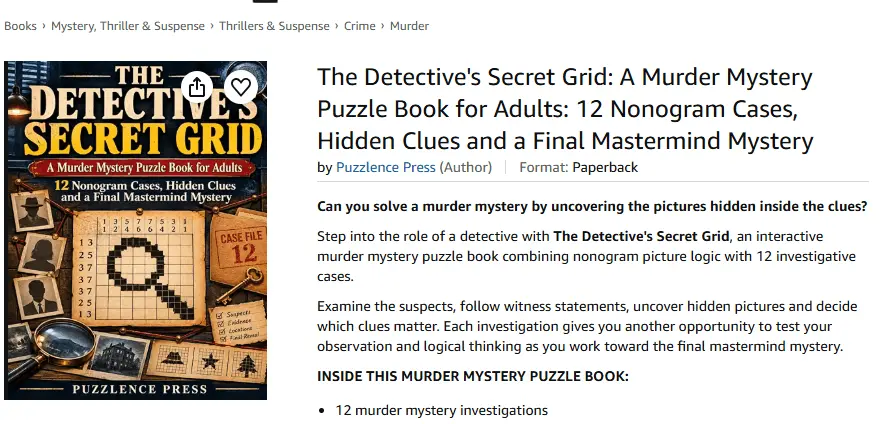
The result is a 160-page paperback called The Detective’s Secret Grid, which is now live on Amazon.
In this NAZO BOX review, I’ll walk you through what the software does, how I used it, what I liked, where I think it could be better, and whether it’s worth considering if you publish puzzle books on KDP.
What Is NAZO BOX?
🎁 Download 15 FREE KDP Interior Templates
Save time and create beautiful low-content books faster with these 15 ready-to-use KDP interiors — completely free! Perfect for journals, planners, and activity books.
NAZO BOX is a browser-based software application developed by Ike Paz and Luke Bowes under Royalty Prints.
Its main purpose is to help publishers create murder mystery nonogram puzzle books.
A nonogram is a picture-logic puzzle. You use numerical clues along the rows and columns of a grid to determine which squares should be filled. When solved correctly, the grid reveals a hidden picture.
NAZO BOX takes this format and adds a mystery element.
Each puzzle is connected to a fictional case. The reader examines the clues, solves the nonogram, reveals a hidden picture, and uses that information as part of the investigation.
The software is designed to handle the puzzle-generation process, solution checking, and book layout in one place.
You can also edit the generated pages and export your finished project.
>>Official website: Nazo Box
Why I Decided to Try NAZO BOX
I’ve been publishing books on Amazon KDP for years, and I’ve worked with different types of low-content and activity books.
One thing I’ve noticed is that producing another generic puzzle book doesn’t necessarily give readers a reason to choose it over the many similar books already available.
I wanted to explore a different format.
Murder mystery puzzle books combine two things that can work well together: solving puzzles and following an investigation.
But creating a book like this manually involves more than putting grids on pages. You need to make the clues work, check the solutions, develop the cases, and organize everything into a readable book.
I was interested in seeing whether NAZO BOX could simplify that process.
My Hands-On Experience: Creating a 160-Page Book
The Detective’s Secret Grid
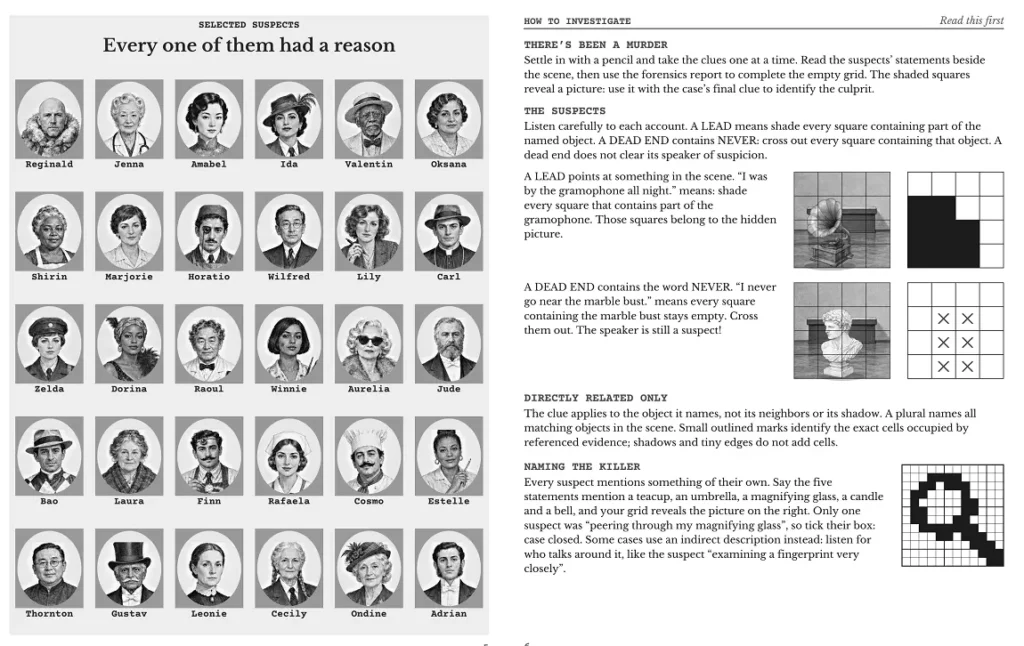
I used NAZO BOX to create a 160-page murder mystery puzzle book with 12 fictional investigations.
Here’s what I included in the finished book:
- 12 murder mystery investigations
- Easy, medium, and hard difficulty levels
- 10×10, 12×12, and 15×15 nonogram grids
- Suspects and witness statements
- Investigative clues and forensic reports
- Hidden pictures revealed by solving the grids
- Hints and complete solutions
- Bonus puzzles, including spot-the-difference and coded messages
- A final mastermind mystery connecting the investigations
This wasn’t simply a collection of unrelated nonogram puzzles. I wanted the reader to feel like they were working through a casebook, examining evidence and using the puzzle results to progress through each investigation.
The finished book is now published on Amazon as a paperback.
See The Detective’s Secret Grid on Amazon
This gave me a practical way to evaluate the software. I could look at the finished result as a real publishing project rather than just a collection of screenshots.
How Does NAZO BOX Work?
The main idea behind NAZO BOX is that it automates much of the technical work involved in creating nonogram puzzles.
Here’s what the software is designed to do.
1. Generate Picture-Logic Puzzles
The software creates a hidden picture and converts it into a grid with numerical clues.
Those numbers tell the reader how many consecutive filled squares appear in each row and column.
Doing this manually can be time-consuming, particularly when you’re creating a complete book with different grid sizes and difficulty levels.
2. Check Puzzle Solutions
This is one of the most interesting parts of NAZO BOX.
According to the developers, its picture-logic engine attempts to solve each generated puzzle before it is included in the book. Puzzles that do not meet the engine’s solution requirements are rejected.
The purpose is to avoid puzzles with multiple valid answers or no valid answer.
This is an important feature because an incorrect puzzle can frustrate readers and lead to complaints or negative reviews.
3. Build the Mystery Around the Puzzle
NAZO BOX is designed specifically for murder mystery nonograms.
The hidden picture becomes part of the investigative experience rather than just a picture to reveal.
This gives the book a different structure from a traditional nonogram collection.
4. Edit the Generated Pages
You aren’t limited to accepting every generated page exactly as it appears.
The software provides editing controls for page elements, including text, images, fonts, sizing, and positioning.
You can also add pages for instructions, notes, and other front or back matter.
I recommend reviewing the generated content carefully before publishing. A generated draft is a starting point, not a substitute for editorial checks.
5. Export Your Finished Book
NAZO BOX advertises three main export formats:
- PDF for complete books
- PNG for individual pages
- JPG for individual pages
The PDF export is intended for print publishing, while individual page images can be useful for product previews and promotional materials.
The front-end plan advertises up to 100 PDF exports per month. Check the current offer for the exact limits.
NAZO BOX Features: What Do You Get?
Here are the main features worth knowing about.
| Feature | What it does |
|---|---|
| Nonogram generation | Creates picture-logic puzzles |
| Solution checking | Checks puzzles for a valid unique solution |
| Mystery scenarios | Connects puzzles with fictional investigations |
| Page editor | Allows you to customize page elements |
| Page insertion | Adds extra pages to your project |
| Project library | Saves projects for later editing |
| PDF export | Exports complete books |
| PNG and JPG export | Exports individual pages |
| Training | Provides tutorials to help users get started |
| Commercial rights | The offer advertises commercial rights for created books |
The software is designed to run in a browser, so you don’t need to install a traditional desktop puzzle-design application.
What I Like About NAZO BOX
1. It Focuses on a Specific Puzzle Format
Rather than trying to be a general-purpose book designer, NAZO BOX focuses on murder mystery nonogram books.
That specialization is useful because the software is built around the relationship between the picture puzzle and the mystery.
2. Automatic Puzzle Verification
I consider the solution-checking engine one of its most important features.
A puzzle book needs to provide correct answers. Having software check the generated puzzles can reduce the amount of manual testing involved.
I would still recommend checking the final book and its answer pages before uploading.
3. The Editing Options
Being able to edit generated pages matters.
You may want to change wording, adjust layouts, add instructions, or create a more consistent look across your book.
Having those controls in the same application makes the workflow more convenient.
4. It Can Help You Explore a Different KDP Product
The murder mystery nonogram format is more specialized than a standard word search or Sudoku book.
For publishers who want to experiment with a different type of puzzle book, this gives them a starting point.
However, a different format doesn’t automatically mean lower competition or guaranteed sales. You still need to research the audience and create a book people want to buy.
5. No Monthly Subscription on the Front End
The launch offer describes the front-end purchase as a one-time payment rather than a recurring subscription.
That can be appealing if you prefer to avoid another monthly software expense.
Always confirm the final price and terms at checkout.
NAZO BOX Limitations: What Should You Know?
No software is perfect, and I think it’s important to discuss the limitations before recommending a purchase.
1. It Specializes in Murder Mystery Nonograms
NAZO BOX isn’t a general-purpose puzzle-book generator.
If you mainly want to create word searches, Sudoku books, mazes, or ordinary math workbooks, this isn’t the tool I’d choose for those projects.
Its main focus is murder mystery nonogram books.
2. You Still Need to Review Your Book
Even when software generates the puzzles and checks their solutions, you remain responsible for the final product.
Review the stories, clues, instructions, answer pages, spelling, formatting, and overall reading experience.
Don’t upload a generated manuscript without checking it.
3. The Front End Has a PDF Export Limit
The front-end offer advertises up to 100 PDF exports per month.
If you expect to export more frequently, check the optional upgrade that advertises unlimited exports.
4. Cover Design Is Not Included in the Front End
The front-end version focuses on creating the book interior.
You’ll still need a separate solution for your cover unless you purchase an upgrade that includes additional publishing tools.
I created the cover for my book separately.
5. No Refund Policy
This is something I would not overlook.
The launch offer states that all sales are final. That means you should watch the demonstration, understand the included features, and review the checkout terms before purchasing.
I wouldn’t recommend buying it simply because of a launch discount.
NAZO BOX Pricing and Optional Upgrades
During the November 2026 launch, the advertised front-end price is $19 as a one-time payment.
There are also optional upgrades:
| Product | Advertised launch price |
|---|---|
| NAZO BOX (Front End) | $19 |
| NAZO BRIGHT | $57 |
| SAGASE BOX | $187 |
| HAKO Escape | $47 |
The upgrades are separate products with additional capabilities.
- NAZO BRIGHT: Adds another puzzle format and additional features, including unlimited PDF exports.
- SAGASE BOX: Adds search-and-find book creation and additional publishing tools.
- HAKO Escape: Focuses on printable escape-room kits.
My suggestion is to evaluate the front end first. Don’t assume you need every upgrade to create your first murder mystery nonogram book.
Prices and promotional terms can change, so check the actual checkout page before buying.
Is NAZO BOX Worth It for Amazon KDP Publishers?
I think NAZO BOX is worth considering if you’re specifically interested in creating murder mystery nonogram books.
The biggest appeal is the combination of puzzle generation, solution checking, mystery content, editing, and export capabilities.
Instead of building every grid and calculating its clues manually, you can use the software to create a starting manuscript and then work on improving the finished book.
But there are a few things to keep in mind.
The software doesn’t research your market for you, guarantee Amazon rankings, or bring customers to your listing.
You’ll still need to:
- Research relevant keywords and competitors.
- Decide who your book is for.
- Review and improve the generated content.
- Create a professional cover.
- Check the print-ready PDF.
- Write an accurate Amazon listing.
- Promote your book and monitor its performance.
In other words, NAZO BOX can help with book production, but it doesn’t replace the publishing work around it.
Who Should Consider NAZO BOX?
I would put these publishers on the list:
- Amazon KDP publishers interested in puzzle books.
- Beginners who want to explore nonogram puzzle books.
- Existing puzzle-book publishers looking for a different format.
- Printable creators who want to experiment with mystery-themed puzzles.
- Publishers who don’t want to calculate every nonogram grid manually.
On the other hand, if you have no interest in murder mystery puzzles or picture-logic games, you probably don’t need this particular tool.
My Final Verdict: Should You Try NAZO BOX?
After using NAZO BOX to create The Detective’s Secret Grid, I can see why a specialized tool for murder mystery nonogram books could be useful to KDP publishers.
Its main strength is bringing puzzle generation, solution checking, mystery-themed content, page editing, and exporting into one workflow.
I particularly like the idea of turning a solved picture into an investigative clue. It gives the finished book a different experience from a standard collection of picture-logic puzzles.
It isn’t a magic button for building a profitable KDP business. You’ll still need to research your niche, check your content, create a professional listing, and market your book.
But if you’re interested in this specific puzzle format and want a tool to help with production, NAZO BOX is worth investigating.
The November 2026 launch ends on November 26. Review the offer and its no-refund terms before making a decision.
Affiliate disclosure: This article contains affiliate links. If you purchase through my link, I may earn a commission at no additional cost to you. I only recommend considering a product after looking at what it offers and how it fits your publishing needs.
Frequently Asked Questions About NAZO BOX
What is NAZO BOX used for?
NAZO BOX is designed to create murder mystery nonogram puzzle books. It generates picture-logic puzzles, connects them with fictional mystery scenarios, and provides tools to edit and export the finished pages.
Can I use NAZO BOX for Amazon KDP?
The software is designed to create book interiors for publishing platforms such as Amazon KDP. You’ll still need to follow KDP’s current formatting, content, cover, and publishing requirements.
Does NAZO BOX check puzzle solutions?
The developers describe a picture-logic engine that checks generated puzzles and rejects those that don’t meet its unique-solution requirements.
Can I edit the books created with NAZO BOX?
Yes. The software advertises editing controls for text, images, fonts, positioning, and page elements.
Does NAZO BOX include commercial rights?
The offer advertises commercial rights for books created with the software. Review the actual licence terms to understand the permitted uses and any restrictions.
Is NAZO BOX a monthly subscription?
The launch front-end offer is advertised as a one-time payment. Confirm the current checkout terms before purchasing.
Does NAZO BOX include book cover design?
Cover and additional publishing tools are offered through an optional upgrade. The front-end version focuses on creating the book interior.
Is NAZO BOX suitable for beginners?
It may be suitable for beginners interested in murder mystery nonogram books. However, you’ll still need to learn basic publishing tasks such as keyword research, cover creation, proofreading, and KDP formatting.
My Recommended KDP Masterclass 2026 💡
KDP Masterclass By Self Publishing Titans
I absolutely love this Masterclass because it’s one of the most up-to-date and practical KDP courses available. The creators aren’t just teachers — they’re real KDP publishers who’ve earned over $300K in book royalties! 📚 I personally took this class and noticed a steady increase in my KDP sales over time. If you’re serious about growing your publishing business in 2026, this course is a total game changer.