Titans Pro Amazon KDP Keyword Research Tutorial (2026 Guide)
Titans Pro is one of my favorite keyword and niche research tools for Amazon KDP. It has both a Chrome extension and a web app, but I personally prefer the Chrome extension.
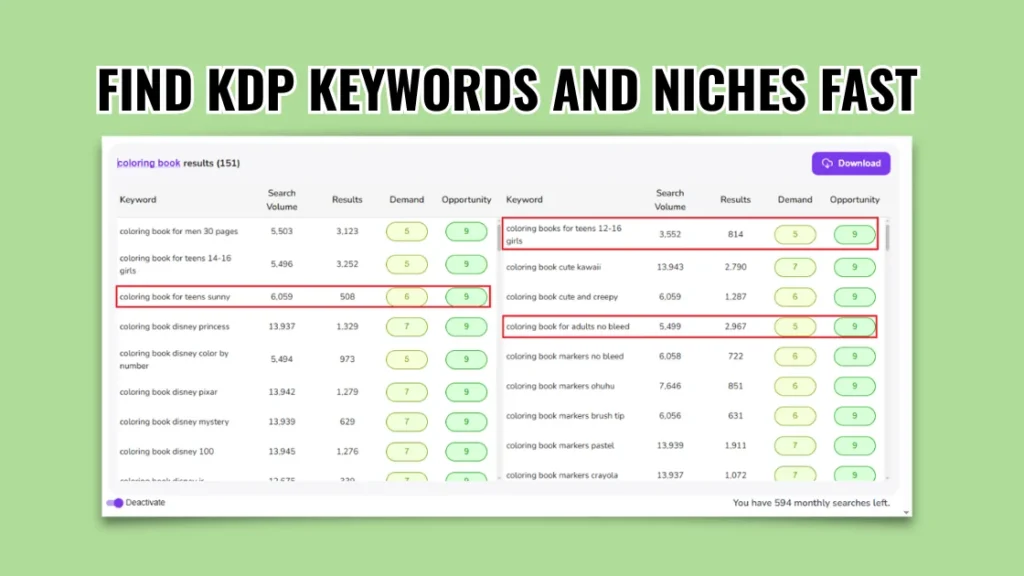
The beauty of this Amazon KDP keyword research tool is that it quickly shows you a lot of Amazon search suggestions, aka keywords, in one click. It not only shows you keywords, but it also shows a lot of helpful data like Amazon search volume, Amazon search results, demand score, and opportunity score.
It’s important to note that the search volume data provided by third-party tools, including Titans Pro, is based on estimates, as Amazon doesn’t disclose these numbers publicly. With that said, let’s just see how Titans Pro works for Amazon KDP keyword and niche research.
If you want to follow along with this tutorial, you can try Titans Pro here.
It’s one of the fastest tools I’ve used for finding low-competition KDP keywords and niche ideas directly from Amazon search data.
KDP Keywords Vs KDP Niches
Before moving forward, let me just clarify the difference between a keyword and a niche.
KDP Keywords
A keyword is essentially a search term that people type or speak into the search bar. It could be a single word, a couple of words, or a long search phrase. For example, someone looking for a coloring book may type one of the following:
- Coloring book
- Coloring book for kids
- Coloring book for kids ages 1-3
- Animal coloring book for kids ages 1-3
- big and bold coloring book
All the above variations of search terms/queries are known as keywords.
KDP Niches
A KDP niche is a long-tail version of a keyword. Let’s understand this with our coloring book example. If “coloring book” is a keyword, then longer versions like “coloring book for kids” or “coloring book for kids ages 1-3” are known as niches.
To put it another way, a KDP niche is primarily a well-defined version of a customer’s search term.
See some more examples below:
| KDP Keywords | KDP Niches |
|---|---|
| coloring book | coloring book for kids coloring book for kids ages 4-8 coloring book for kids ages 8-12 coloring book for kids ages 10-12 girls |
| puzzle book | word search puzzle book crossword puzzle books for teens cryptograms puzzle books for adults puzzle books for seniors memory |
| activity book | activity book for 1 year old activity book for 2 year old boy scissor activity book for 5 year old 1 year old girl activity book |
🎁 Download 15 FREE KDP Interior Templates
Save time and create beautiful low-content books faster with these 15 ready-to-use KDP interiors — completely free! Perfect for journals, planners, and activity books.
By now, you should have a fairly good idea of the key differences between a KDP keyword and a KDP niche.
How I Use Titans Pro to Find KDP Keywords and Niches
Whenever I plan to create a new KDP book, I use Titans Pro (Chrome extension) to quickly find keyword and niche ideas. I like this tool for the following reasons:
- It’s super quick and gives me a lot of keyword ideas that I would never think of while doing it manually.
- It also shows estimated search volume and Amazon search results, which give me an idea of demand and competition.
- It assigns a demand score and an opportunity score, which make it super easy to pick the right keywords and niches.
- It has a separate built-in module that takes a single keyword and analyzes the first-page data for it.
Now let’s see Titans Pro in action.
Step 1 – Finding Keywords Ideas / Niches
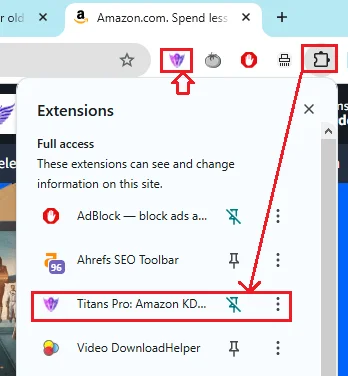
Once you install the Titans Pro Chrome extension, you can go to the little Extensions button on your Chrome browser (top-right) and pin it.
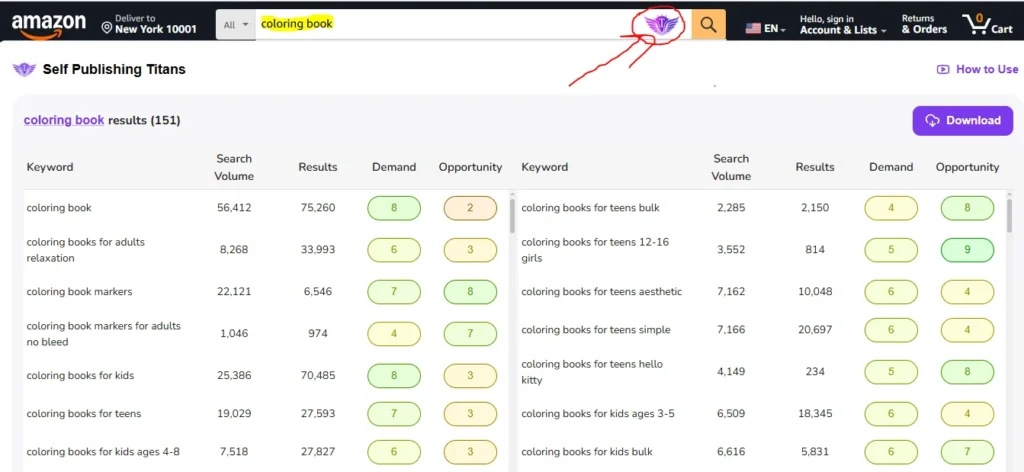
Next, input a broad keyword like coloring book, activity book, or puzzle book into the Amazon search bar and click on the little Titans Pro icon.
I just typed “coloring book” and clicked the extension, and it quickly loaded all the related Amazon search suggestions.
Next, I sorted them by the opportunity score (highest to lowest). If you prefer, you can also sort them by search volume, results (Amazon search results), or demand.
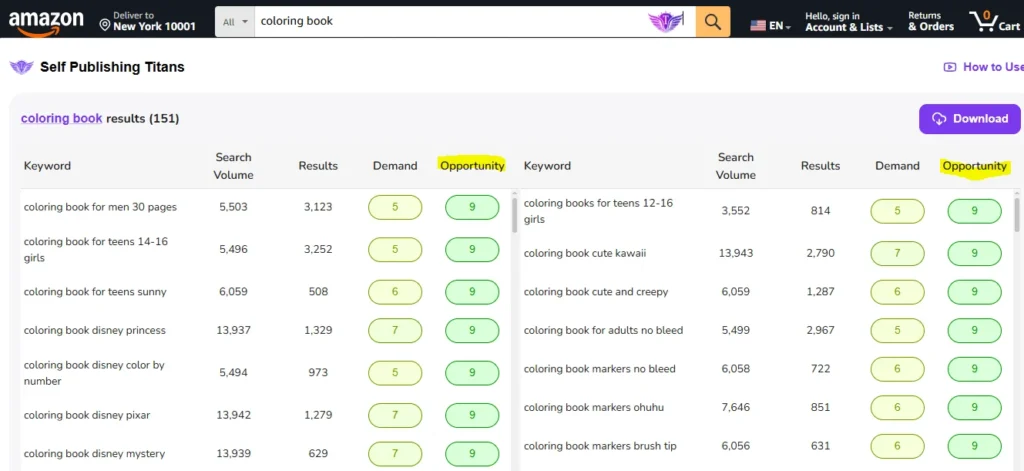
Ideally, I look for a keyword/niche that has:
Opportunity Score: At least 9
Demand Score: 5 or higher
Search Volume: At least 500 – the higher the better
Search Results: Not more than 3,000 – the lower the better
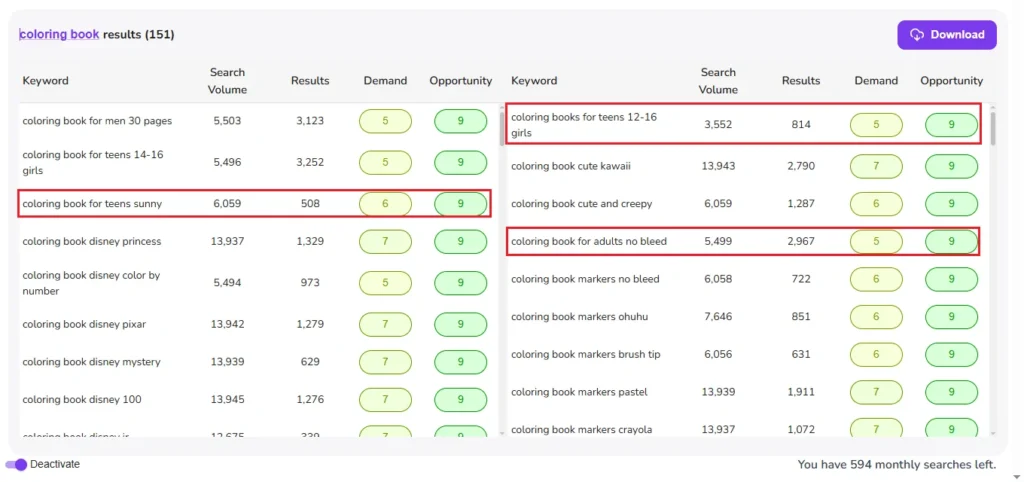
Based on this criteria, I quickly go through all the keyword suggestions and then open the potential niche ideas in new tabs (hold the Shift key and click).
So, I found these potential keyword/niche ideas:
- coloring book for teens sunny
- coloring book for men 30 pages
- coloring books for teens 12-16 girls
Step 2 – Analizing Keywords Ideas / Niches
Next, I opened one potential niche idea in a tab to further analyze it for competition and demand. In this step, Titans Pro checks the first-page data and shows me a quick overview of the competition and demand.
I use this data to make a final decision on whether to go with this niche idea or not. To demonstrate this, I opened the first idea: coloring book for teens sunny. I chose this because it has a higher search volume (over 6k) and a low number of search results (508).
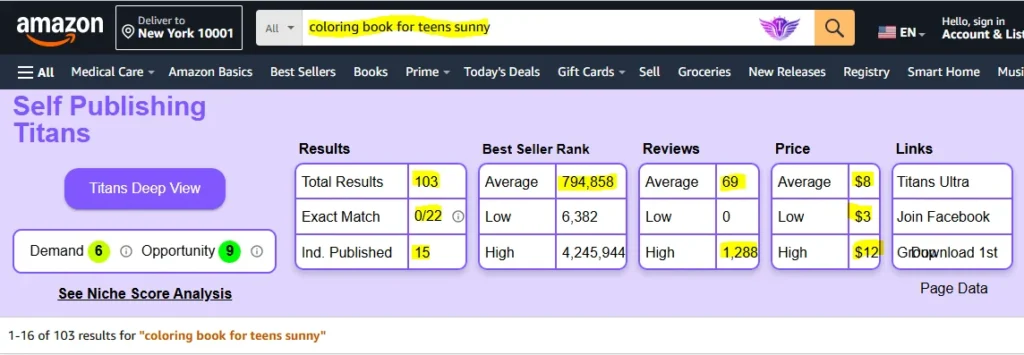
The niche coloring book for teens sunny, has a demand score of 6 and an opportunity score of 9.
- Search Results: 105 search results (Amazon shows different data at different times, weird but it does)
- Exact Match: 0/22 – there are 22 title on the first page and no one is using this exact search terms in the title.
- Ind. Published: There are 15 independently published books out of 22
Based on the above data, it looks like “coloring book for teens sunny” is a good niche, but there is one more step to go before I make a final decision.
Step 3 – Analysing the Actual Books on the First Page
Then comes the third and final step of KDP niche research — analyzing the actual books on the first page. This is important because I can’t just rely on tools and publish books that may not sell well.
In this step, I open 3 to 6 (sometimes more) books ranking on the first page in new tabs and look at a couple of things like:
- Book cover
- Best seller rank
- No. of reviews
- Listing age
When I see multiple newly published books with a low number of reviews getting good sales, I consider this a good sign. Otherwise, I move on and start analyzing the next niche idea.
In Conclusion
The key to successful KDP keyword and niche research is balancing demand with low competition. Titans Pro helps speed up the process, but manually reviewing the books on the first page is still essential before publishing.
👉 Related Post: How I Make Money with Amazon KDP: My Simple, Repeatable System
My Recommended KDP Masterclass 2026 💡
KDP Masterclass By Self Publishing Titans
I absolutely love this Masterclass because it’s one of the most up-to-date and practical KDP courses available. The creators aren’t just teachers — they’re real KDP publishers who’ve earned over $300K in book royalties! 📚 I personally took this class and noticed a steady increase in my KDP sales over time. If you’re serious about growing your publishing business in 2026, this course is a total game changer.