Low Content Pro Review: Create Amazon KDP Interiors Faster with 337 Ready-to-Use Templates
If you’ve ever published low-content books on Amazon KDP, you already know that finding a good niche is only half the battle.
The next step is building the book interior, and that’s where most publishers spend hours. Creating planners, journals, trackers, and logbooks from scratch can quickly become repetitive. Even if you use Canva or another design tool, you’re often recreating the same layouts over and over again.
That’s exactly the problem Low Content Pro aims to solve.
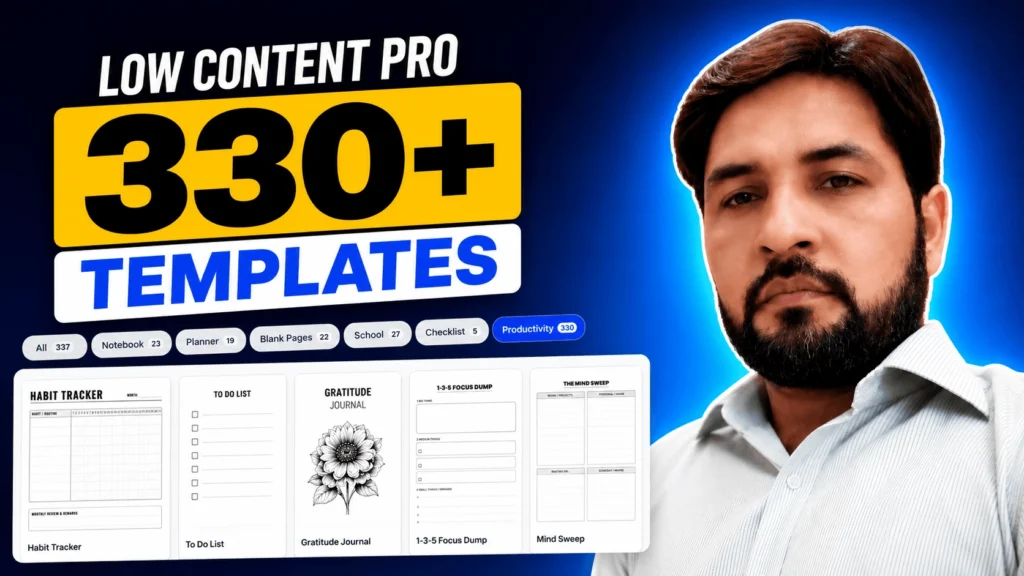
Created by Self Publishing Titans, Low Content Pro is a browser-based book creator that lets you build professional low-content book interiors using a drag-and-drop editor and more than 337 customizable templates. Instead of starting with a blank page, you simply choose a template, customize it to match your niche, and export a print-ready PDF for Amazon KDP.
I recently got access to the software and decided to take it for a spin. In this review, I’ll show you exactly how it works, what I liked, what could be improved, and whether I think it’s worth buying.
If you’re looking for a faster way to create journals, planners, logbooks, worksheets, and other low-content books, keep reading.
Disclosure: This article contains affiliate links. If you purchase through my links, I may earn a commission at no additional cost to you. Thank you for supporting my work.
What Is Low Content Pro?
🎁 Download 15 FREE KDP Interior Templates
Save time and create beautiful low-content books faster with these 15 ready-to-use KDP interiors — completely free! Perfect for journals, planners, and activity books.
Low Content Pro is an online interior design tool developed by Self Publishing Titans. It was built specifically for Amazon KDP publishers and anyone creating printable or low-content products for platforms like Etsy.
Instead of designing every page manually, you start with one of the included templates and customize it using a visual drag-and-drop editor. Once you’re happy with the design, you can export a high-resolution PDF that’s ready for publishing.
At the time of writing, Low Content Pro includes:
- More than 337 professionally designed templates
- A Canva-style drag-and-drop editor
- Multi-page book builder
- Commercial use license
- Print-ready PDF export
- Lifetime access with a one-time payment
Unlike many design tools that charge a monthly subscription, Low Content Pro is currently available with a lifetime license, making it an interesting option for publishers who regularly create low-content books.
Why I Wanted to Try Low Content Pro
I’ve been publishing books on Amazon KDP for several years, and one thing hasn’t changed.
Creating interiors takes time.
Even simple projects like appointment planners or habit trackers require careful formatting. You have to think about margins, spacing, typography, bleed settings, and overall consistency.
I’ve used different methods over the years.
Sometimes I created interiors manually.
Sometimes I used Canva.
Sometimes I relied on templates.
Every workflow has its pros and cons.
When I heard that Self Publishing Titans had launched a completely new version of their Low Content Book Maker with a built-in editor and hundreds of templates, I was curious to see whether it could actually save time.
More importantly, I wanted to know whether it was flexible enough for real publishing projects or if it was simply another template library.
So instead of reading the sales page, I decided to create an actual book with it.
My First Impressions
The first thing I noticed after opening Low Content Pro was how clean the interface felt.
If you’ve used Canva before, you’ll probably feel comfortable within a few minutes.
Everything is organized into categories, and finding templates is surprisingly easy.
Rather than dumping hundreds of templates into one long list, the software groups them into logical sections such as:
- Notebooks
- Planners
- Blank Pages
- Education
- Checklists
- Productivity
- Health
- Fitness
- Finance
- Business
- Faith
- Hobbies
- Games
- Logbooks
- Home
I actually liked this approach because it makes browsing much faster.
Instead of wondering where a specific template might be hiding, you simply click the category you’re interested in.
There’s also a search feature that works well.
For example, typing words like planner, tracker, or log instantly filters the available templates, making it easy to find what you’re looking for.
This might sound like a small feature, but when you’re working with hundreds of templates, a good search function makes a big difference.
A Huge Library of Ready-to-Use Templates
One of the biggest selling points of Low Content Pro is its template library.
At the time of writing, the software includes more than 337 customizable templates, covering many of the most popular low-content book niches on Amazon KDP.
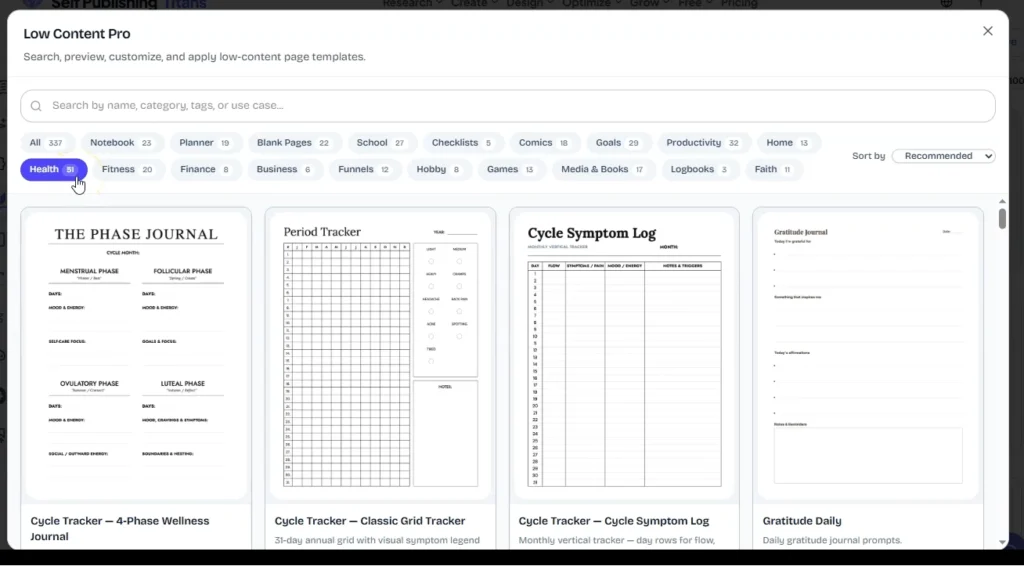
Some of the categories include:
Planners
Daily planners
Weekly planners
Monthly planners
Goal planners
Morning routines
Project planners
Appointment planners
Health & Wellness
Hydration trackers
Blood pressure logs
Symptom journals
Gratitude journals
Meal planners
Fitness logs
Fasting trackers
Education
Lesson planners
Reading logs
Assignment trackers
Cornell notes
Handwriting paper
Attendance sheets
Study planners
Finance
Budget planners
Expense trackers
Debt payoff trackers
Savings challenges
Business logs
Client records
Faith
Prayer journals
Bible study worksheets
Scripture memory pages
Sermon notes
Devotional planners
Hobbies
Travel journals
Fishing logs
Golf scorebooks
Comic layouts
Storyboards
Pilot logs
Truck driving logs
And that’s only a portion of what’s available.
The nice thing is that these aren’t locked PDF templates.
They’re fully editable, which means you can change text, fonts, spacing, colors, tables, and many other elements before exporting your final book.
That gives you much more flexibility than simply downloading a static template.
Creating My First Amazon KDP Book
After spending some time exploring the template library, I wanted to see how quickly I could turn one of those templates into a finished book.
For this test, I decided to create something simple: an Appointment Planner.
This is the type of low-content book that many KDP publishers create because it’s straightforward, evergreen, and easy to customize for different audiences.
Instead of starting with a blank page, I searched for “Appointment Planner” in the template library.
Within a few seconds, I found a matching template and opened the preview.
The preview gave me a clear idea of how the finished page would look before adding it to my project. Once I was happy with the layout, I simply selected the template and added it to my book.
Building a Multi-Page Interior
One feature I really liked was how easy it is to create a complete book instead of working one page at a time.
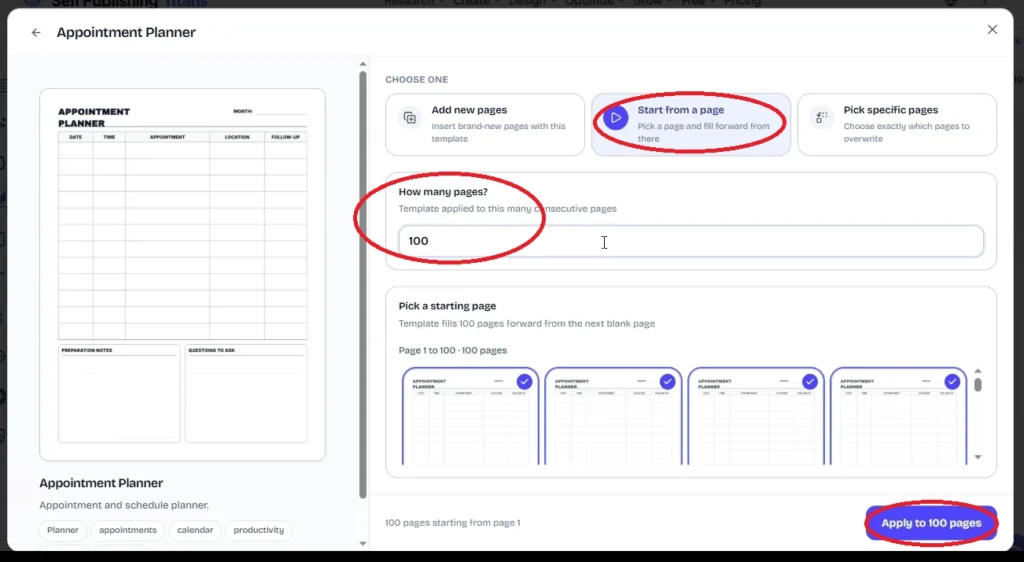
After selecting the Appointment Planner template, the software asked how many pages I wanted to generate.
For this example, I entered 100 pages.
Instead of manually duplicating pages over and over again, Low Content Pro instantly created a 100-page project using the same layout.
That alone can save a surprising amount of time, especially if you’ve ever duplicated pages manually in Canva or another design program.
Once the pages were generated, I could immediately start editing them.
Exploring the Editor
This is where Low Content Pro really starts to stand out.
The editor feels familiar from the moment you open it. If you’ve used Canva before, you’ll quickly understand how everything works.
The workspace includes a page preview in the center, page thumbnails on the side, and editing options that appear whenever you select an element.
Rather than navigating through complicated menus, most settings are only one or two clicks away.
I also liked that you can switch between different viewing modes depending on how you prefer to work.
For example, you can view multiple pages at once while organizing your book or switch to a single-page view when making detailed edits.
Being able to collapse the side panels also gives you more space to focus on the page itself.
Customizing the Layout
One thing that impressed me was the level of control you have over each template.
These aren’t static designs.
Almost every element can be adjusted.
For example, I was able to:
- Change page margins
- Increase or decrease spacing
- Adjust section spacing
- Edit headings
- Change fonts
- Modify line thickness
- Adjust table borders
- Change colors
- Resize elements
- Lock objects in place
- Duplicate or delete items
This means you can take a generic template and make it feel much more unique without having to rebuild the entire page.
For publishers creating multiple books in the same niche, this flexibility is especially useful.
Changing Fonts and Typography
Typography plays a big role in how professional a book looks.
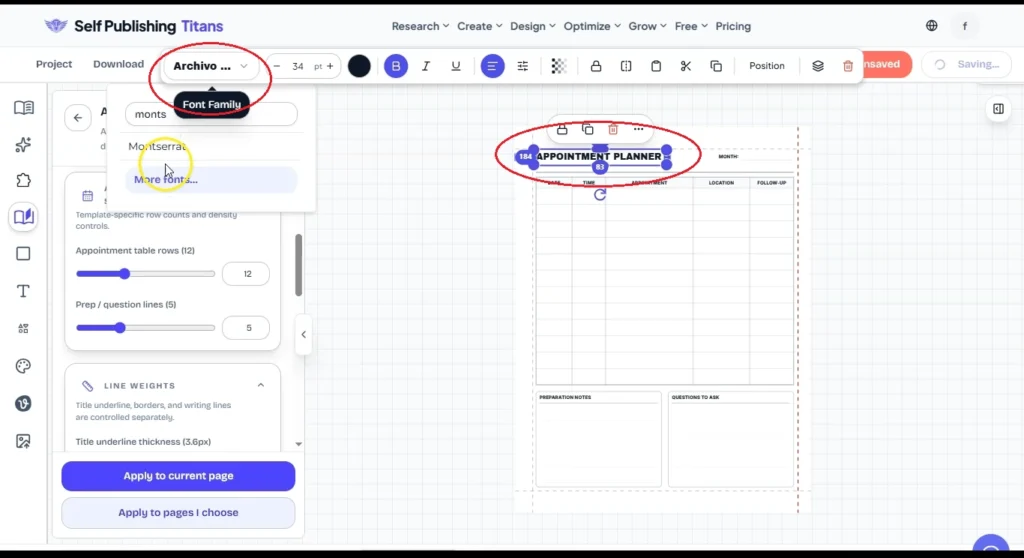
Low Content Pro makes changing fonts surprisingly simple.
Rather than editing each text box individually, you can update different typography groups throughout the page.
For example, I changed:
- The main heading font
- Section headings
- Body labels
Within seconds, the overall appearance of the page looked completely different.
If you’re trying to create a planner for adults, children, teachers, or professionals, changing the typography is one of the fastest ways to give the book its own style.
Adjusting Tables, Rows, and Spacing
This was one of my favorite features during testing.
Many planner templates rely heavily on tables.
Normally, adding more rows or changing spacing means rebuilding the layout manually.
Here, I simply adjusted the settings.
For example, I could:
- Increase the number of rows
- Reduce the number of rows
- Change section spacing
- Adjust writing line thickness
- Modify border weight
- Resize table sections
Everything updated automatically without breaking the layout.
That makes experimenting much easier because you’re not worried about accidentally ruining the page design.
Applying Changes Across the Entire Book
Imagine you’ve already created a 100-page planner and then decide you’d rather use a different font.
In Canva, that could become a tedious process.
Low Content Pro handles it much more efficiently.
After customizing one page, you can choose whether to:
- Apply the changes only to the current page
- Apply them to selected pages
- Replace every matching page throughout the project
Since my Appointment Planner contained 100 pages, I simply selected all pages and applied the changes across the entire book.
Within a few moments, every page matched the updated design.
For larger projects, this feature alone can save a significant amount of editing time.
Adding Extra Pages
Most books need more than just interior pages.
You’ll often want:
- A title page
- Copyright page
- Notes page
- Blank pages
- Additional sections
Adding new pages is straightforward.
I inserted a blank page at the beginning of my project and moved it into position using drag and drop.
From there, I added a text element and created a simple title page for the Appointment Planner.
This is another small feature, but it’s one that helps you build the complete interior without jumping between different software.
Overall Editing Experience
After spending time inside the editor, my overall impression was positive.
The software doesn’t try to replace professional design software for every possible use case.
Instead, it focuses on helping KDP publishers create practical, professional-looking interiors as quickly as possible.
That’s exactly what I think most people buying this tool are looking for.
Could you build the same book manually in Canva?
Absolutely.
The difference is the amount of time involved.
Starting with a professionally designed template and customizing it is almost always faster than beginning with a blank page.
If you publish multiple low-content books each month, those time savings can add up quickly.
Exporting a Print-Ready PDF
Once I finished customizing my Appointment Planner, the last step was exporting the project.
The export process is straightforward.
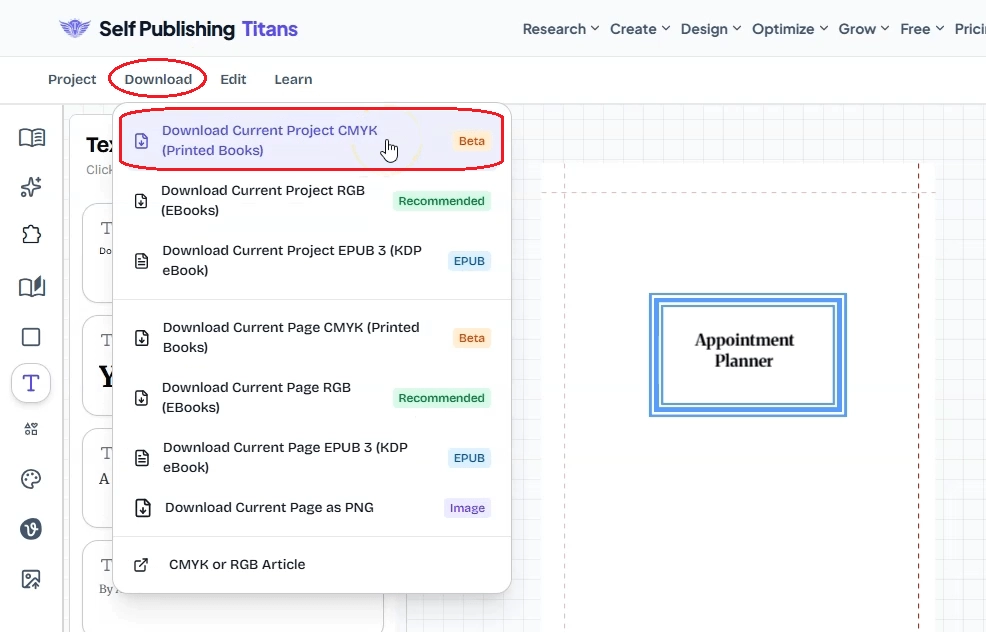
Simply click the Download button, choose your preferred export format, and let the software generate your files.
For Amazon KDP paperbacks, I selected the CMYK option since it’s designed for print. If you’re creating a digital product or ebook, RGB and EPUB export options are also available.
Depending on the size of your project, the export may take a minute or two.
In my case, the software generated a ZIP file containing the completed book interior.
After extracting the files, I opened the PDF to check the final result.
Everything looked exactly as expected.
The planner contained all 100 pages, the formatting remained consistent, and the PDF was ready to upload to Amazon KDP.
For many publishers, that’s the goal. Create the interior, export it, and move on to the next project without spending hours fixing formatting issues.
My Overall Experience
After creating my first book, I came away with a positive impression of Low Content Pro.
It’s clear that the software wasn’t designed to compete with professional design applications like Adobe InDesign.
Instead, it focuses on solving a very specific problem.
Helping KDP publishers create professional-looking low-content book interiors quickly.
I think it succeeds at that.
The interface is easy to understand, the editor feels familiar, and having hundreds of templates available removes one of the biggest hurdles for beginners.
At the same time, experienced publishers can also benefit because it reduces the amount of repetitive design work.
What I Like About Low Content Pro
After using the software, these are the features that stood out to me the most.
1. Large Template Library
Having more than 337 templates gives you plenty of starting points.
Instead of designing every page yourself, you can focus on customizing layouts that already exist.
Whether you’re creating planners, journals, trackers, logbooks, or educational resources, chances are you’ll find something close to what you need.
2. Beginner-Friendly Interface
The editor is easy to learn.
If you’ve used Canva before, you’ll probably feel comfortable within a few minutes.
I didn’t have to spend time watching tutorials before creating my first project.
3. Fast Book Creation
Generating an entire 100-page planner took only a few clicks.
Normally, creating a project like this manually would involve duplicating pages, checking spacing, and making sure everything stays aligned.
Low Content Pro handles much of that work for you.
4. Flexible Customization
This isn’t just a collection of fixed templates.
You can edit fonts, spacing, tables, colors, headings, and many other elements.
That makes it much easier to create books that don’t all look the same.
5. Lifetime Access
One feature I always appreciate is lifetime pricing.
Many publishing tools now charge monthly subscriptions.
If you regularly publish books, a one-time payment can save money over time.
What Could Be Improved
No software is perfect, and I think it’s important to mention a few areas where Low Content Pro could continue improving.
More Templates
While 337 templates already cover a wide range of niches, I’d love to see the library continue growing.
New layouts for emerging KDP niches would make the software even more valuable.
More Fonts
The included typography options are good, but additional font choices would provide even more design flexibility.
More Design Elements
Extra icons, shapes, decorative elements, and graphics would make it easier to personalize templates without importing external assets.
These aren’t major complaints.
They’re simply features I’d like to see added in future updates.
Low Content Pro vs Canva
A question many publishers will ask is whether they actually need another design tool when Canva already exists.
The answer depends on how you work.
| Feature | Canva | Low Content Pro |
|---|---|---|
| Starts with KDP templates | ❌ Usually no | ✅ Yes |
| Designed specifically for low-content books | ❌ | ✅ |
| Multi-page book builder | Limited | ✅ |
| Planner and tracker templates | Limited | ✅ 337+ |
| Print-ready KDP workflow | Manual | ✅ |
| Learning curve | Easy | Easy |
Canva is still one of my favorite design tools, especially for covers, marketing graphics, thumbnails, and social media.
However, when it comes to building low-content book interiors, Low Content Pro provides a more specialized workflow.
Low Content Pro vs Designing Everything Manually
Could you build the same planner yourself?
Yes.
I’ve done exactly that many times over the years.
The real question is how much your time is worth.
If creating one planner manually takes two or three hours, and Low Content Pro reduces that to 20 or 30 minutes, those time savings quickly add up.
That becomes even more important if you’re publishing multiple books every month or creating interiors for clients.
Who Should Buy Low Content Pro?
Based on my experience, I think Low Content Pro is a great fit for:
- Amazon KDP publishers
- Etsy sellers creating printable planners
- Teachers creating worksheets
- Authors publishing journals
- Entrepreneurs selling digital products
- Virtual assistants offering KDP services
- Beginners who don’t have graphic design experience
If your goal is to create interiors faster without starting from scratch each time, this software is definitely worth considering.
Who Might Not Need It?
Low Content Pro may not be the best investment if:
- You only publish one or two low-content books each year.
- You’re already comfortable building everything manually and don’t mind the extra time.
- Your work focuses mainly on fully illustrated children’s books or highly customized layouts.
The software is designed specifically for low-content publishing, so it’s most valuable if that’s your primary focus.
Pricing and Lifetime Deal
At the time of writing, Low Content Pro is available as a one-time purchase during its launch promotion.
Here’s what’s included:
- Low Content Pro Book Builder
- Canva-style drag-and-drop editor
- 337+ customizable templates
- Commercial use license
- Print-ready PDF exports
- Lifetime access
- 7-day money-back guarantee
One thing I appreciate is that there are no recurring monthly fees. You pay once and continue using the software, which can make it a cost-effective option for publishers planning to create multiple books over time.
Note: Pricing and launch discounts can change, so be sure to check the latest offer before purchasing.
👉 Check the latest price and current launch discount here
Frequently Asked Questions
Is Low Content Pro a monthly subscription?
No. At the time of writing, Low Content Pro is available with a one-time payment during the launch period. That means you don’t have to worry about recurring monthly fees.
How many templates are included?
Low Content Pro currently includes 337+ customizable templates covering a wide range of popular low-content book niches.
These include:
- Planners
- Journals
- Trackers
- Logbooks
- Educational worksheets
- Health and fitness
- Finance
- Business
- Faith
- Hobbies
- Blank pages
- And many more
The library may continue to grow with future updates.
Can I publish the books I create on Amazon KDP?
Yes.
The software is designed specifically for creating interiors for Amazon KDP.
However, just like any publishing tool, you’re responsible for making sure your final book follows Amazon KDP’s content guidelines and provides value to customers.
I always recommend customizing the templates instead of publishing them exactly as they are. Making your books unique helps differentiate them from the competition.
Can I sell books created with Low Content Pro on Etsy?
Yes.
One thing I like about Low Content Pro is that it isn’t limited to Amazon KDP.
You can also use it to create printable planners, journals, trackers, and other digital products to sell on Etsy or through your own website.
Do I need design experience?
Not really.
If you know the basics of using Canva, you’ll probably feel comfortable using Low Content Pro.
The interface is clean, the editor is easy to understand, and most editing options are only a click or two away.
That makes it beginner-friendly while still offering enough flexibility for experienced publishers.
Can I customize every template?
Yes.
This is one of the software’s biggest strengths.
You aren’t limited to changing only the title.
You can modify:
- Fonts
- Colors
- Tables
- Lines
- Headings
- Spacing
- Margins
- Typography
- Various page elements
That gives you much more flexibility than working with static PDF templates.
Does Low Content Pro create book covers?
No.
Low Content Pro focuses on book interiors.
You’ll still need to create your cover separately. You can use tools like Canva, the Self Publishing Titans Cover Design Tool, or any other cover design software you’re comfortable with.
Is Low Content Pro Worth It?
After spending time with the software and creating my first project, I think Low Content Pro delivers on what it promises.
It doesn’t try to replace professional publishing software or advanced graphic design applications.
Instead, it focuses on helping KDP publishers create professional-looking low-content interiors much faster.
That’s where I think it provides the most value.
The large template library gives you an excellent starting point, while the drag-and-drop editor makes it easy to customize each page without rebuilding everything from scratch.
I also like that the workflow is built around creating complete books rather than individual pages.
From selecting a template to exporting a print-ready PDF, everything happens inside one workspace.
If you’re publishing planners, journals, trackers, logbooks, or other low-content books regularly, I can see this becoming a tool that saves a significant amount of time.
Who I Think Should Buy It
I’d recommend Low Content Pro if you:
✅ Publish low-content books regularly
✅ Sell planners or printables on Etsy
✅ Want to speed up your interior creation process
✅ Don’t enjoy designing every page from scratch
✅ Prefer a one-time purchase over another monthly subscription
Who Should Skip It?
You might not need Low Content Pro if you:
- Only publish low-content books occasionally.
- Already have a workflow you’re happy with.
- Primarily create highly illustrated children’s books or fully custom layouts that don’t rely on templates.
My Final Rating
After testing Low Content Pro for the first time, here’s how I’d rate it.
| Category | Rating |
|---|---|
| Ease of Use | ⭐⭐⭐⭐⭐ |
| Template Library | ⭐⭐⭐⭐⭐ |
| Customization | ⭐⭐⭐⭐☆ |
| Speed | ⭐⭐⭐⭐⭐ |
| Value for Money | ⭐⭐⭐⭐⭐ |
| Overall | 9.5/10 |
The software is well-designed, easy to learn, and focused on solving a real problem for KDP publishers.
No tool is perfect, but Low Content Pro already offers a solid set of features, and I’m looking forward to seeing how it continues to evolve with future updates.
Watch My Complete Video Review
If you’d like to see Low Content Pro in action, including how I created a complete Appointment Planner from start to finish, you can watch my full walkthrough below.
📺 [Embed Your YouTube Video Here]
Ready to Try Low Content Pro?
If you’ve been creating low-content books manually and want a faster workflow, Low Content Pro is definitely worth a look.
The combination of a Canva-style editor, hundreds of customizable templates, and a one-time payment makes it an attractive option for many KDP publishers.
👉 Check the latest pricing and current launch offer here
If you decide to give it a try, I’d love to hear what you think. Feel free to leave a comment below or let me know which type of book you plan to create first.
Happy publishing!
– Subha
My Recommended KDP Masterclass 2026 💡
KDP Masterclass By Self Publishing Titans
I absolutely love this Masterclass because it’s one of the most up-to-date and practical KDP courses available. The creators aren’t just teachers — they’re real KDP publishers who’ve earned over $300K in book royalties! 📚 I personally took this class and noticed a steady increase in my KDP sales over time. If you’re serious about growing your publishing business in 2026, this course is a total game changer.