How I Find Low-Competition Amazon KDP Niches Using Helium 10 (Step-by-Step Tutorial)
Finding a profitable niche is one of the most important parts of succeeding with Amazon KDP.
If you choose the wrong niche, your book may never get discovered. But if you find a niche with good demand and manageable competition, your chances of getting sales increase significantly.
In this tutorial, I’ll show you my simple 3-step process to find low-competition KDP niche ideas using Helium 10.
This is the same workflow I use to quickly validate whether a niche is worth pursuing or not.
Here’s what we’ll cover:
- Finding potential niche ideas
- Checking keyword demand
- Analyzing competition and revenue distribution
Let’s get started.
🎁 Download 15 FREE KDP Interior Templates
Save time and create beautiful low-content books faster with these 15 ready-to-use KDP interiors — completely free! Perfect for journals, planners, and activity books.
Step 1: Find Potential KDP Niche Ideas Using Black Box
The first step is to generate potential niche ideas using the Black Box tool inside Helium 10.
Go to: Helium 10 → Products → Black Box
Once you are inside the black box tool, the most important thing here is selecting the correct marketplace.
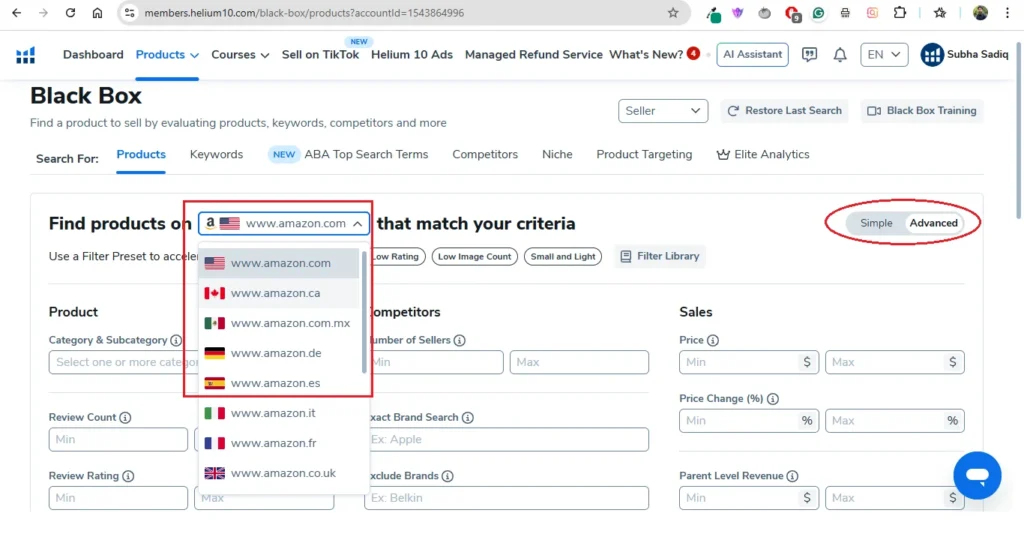
If you are publishing on Amazon.com, make sure that marketplace is selected. If you publish in another Amazon marketplace, choose that instead. Doing niche research in the correct marketplace is crucial.
👉 If you want to follow along, you can get up to 40% off Helium 10 using This Link.
Apply These Filters
Next, apply the following filters to find potential book ideas for Amazon KDP.
Category
first of all you need to choose a product category inside the Amazon marketplace. To do that go to Category & Sub-category filter;
Select: Books → Children’s Books
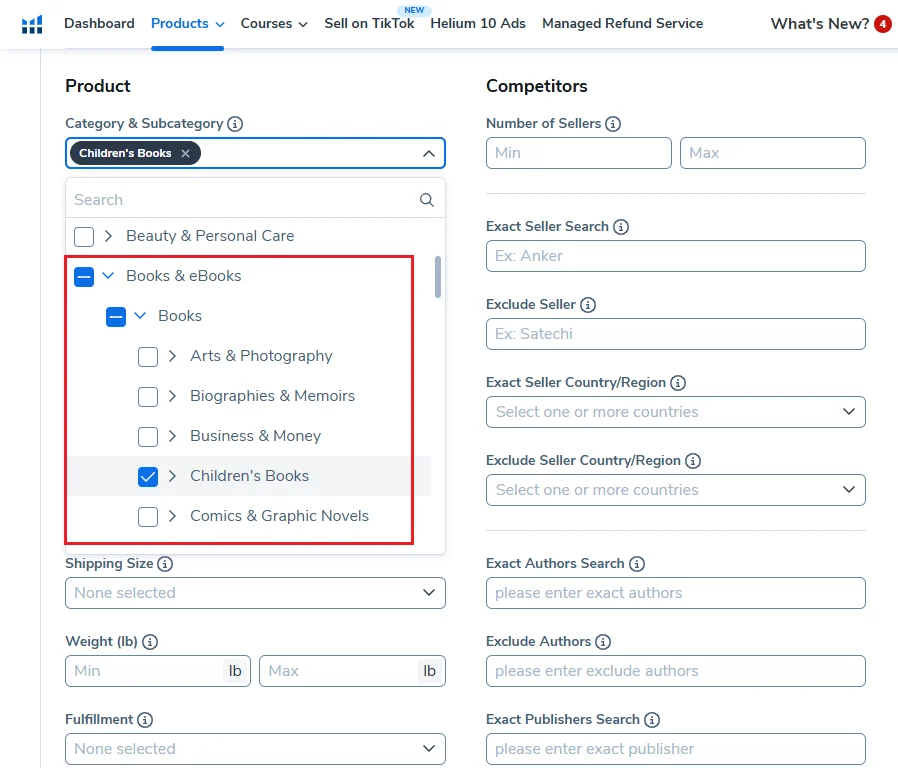
You can also go deeper into subcategories if needed, but for now the main category (Children’s Books) works well.
Price
Set the price range between:
- Minimum: $9.99
- Maximum: $20
This is a common price range for many KDP workbooks. Keep in mind, to earn 60% royalties on Amazon, you should price your book at least $9.99 or higher.
Monthly Sales
Set the sales filter between:
- Minimum: 90 sales per month
- Maximum: 300 sales per month
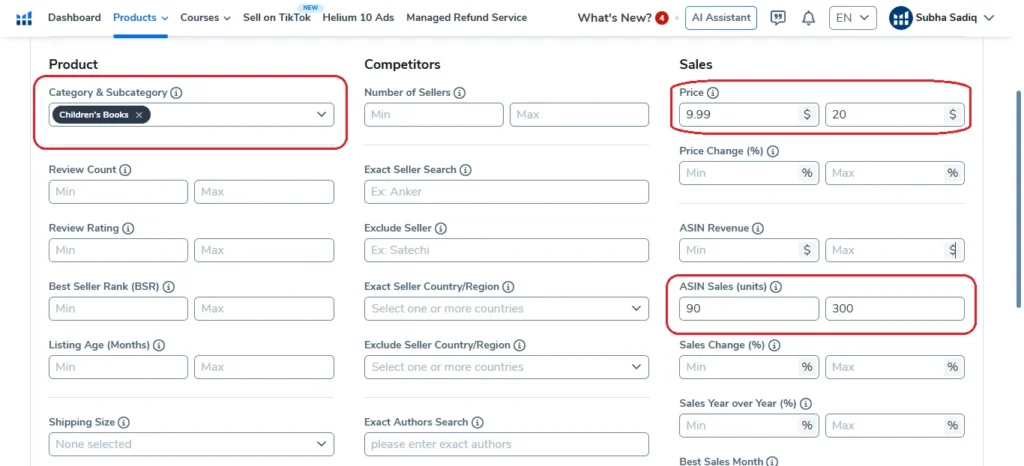
This helps you find books that are selling consistently but are not dominated by huge bestsellers.
Fulfillment
Select:
Fulfilled by Amazon
This ensures you’re looking at self-published books rather than books fulfilled by third-party sellers.
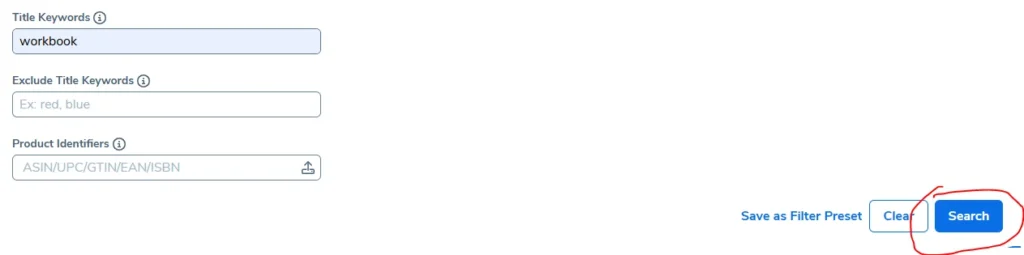
Title Keyword
Add a keyword like:
workbook
This helps narrow results to workbook-type books, which are very common in the KDP space.
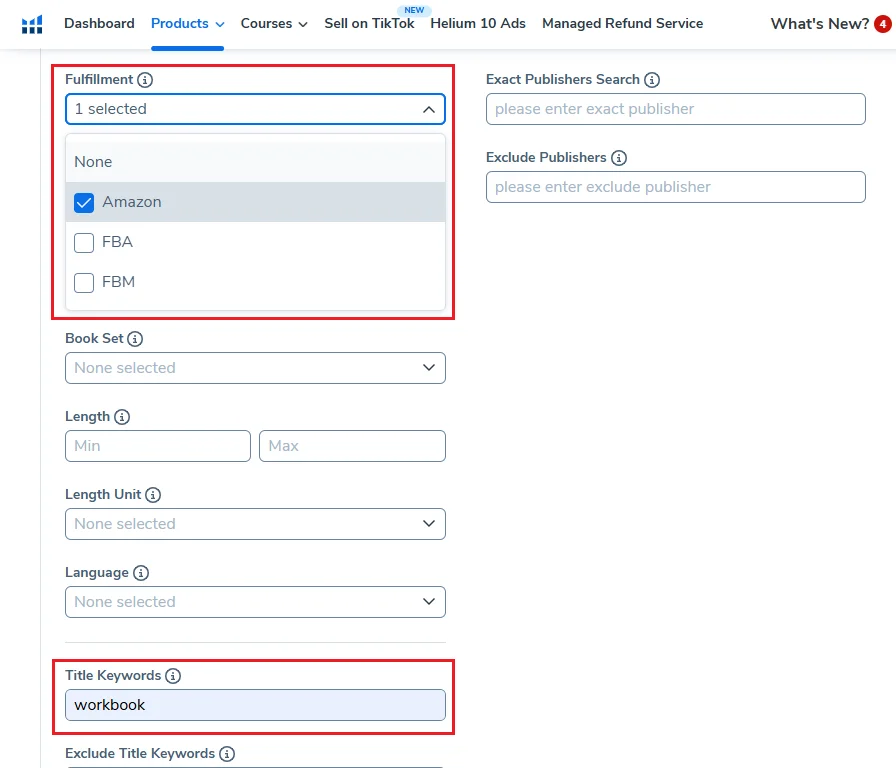
After applying above filters, click Search to see the potential niche ideas / book ideas.
You should see a list of potential book ideas based on the set filters.
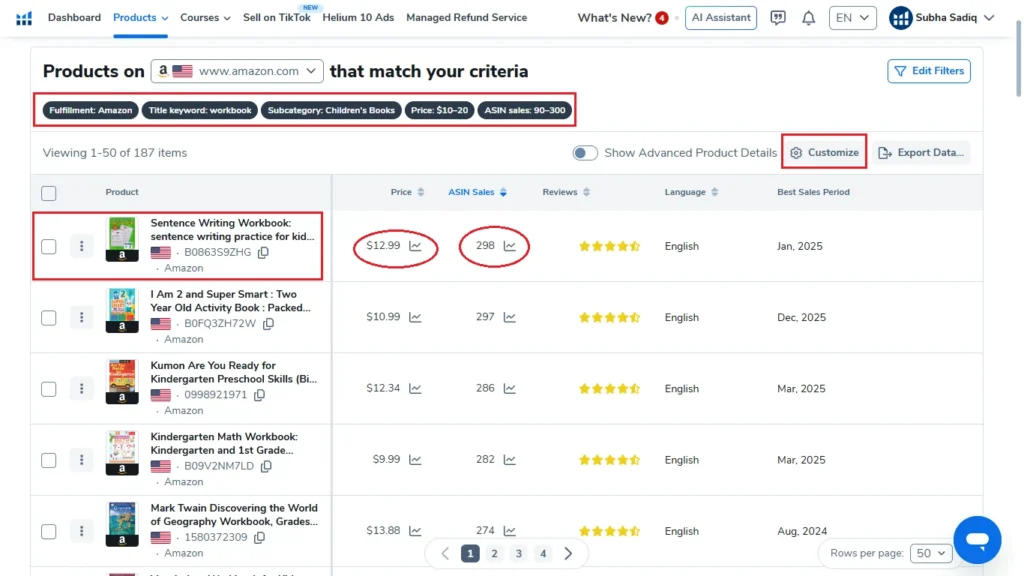
Note: You can customize the column view to hide the unnecessary/extra columns. Just click on the Customize button and uncheck the column you don’t wat to see.
Now you can sort these book ideas / niche idea either by Price or ASIN Sales. I went ahead and sorted these results by ASIN Sales.
Next you go through these ideas and pick the one that appeals to you. For example, one book that stood out to me was a Sentence Writing Workbook.
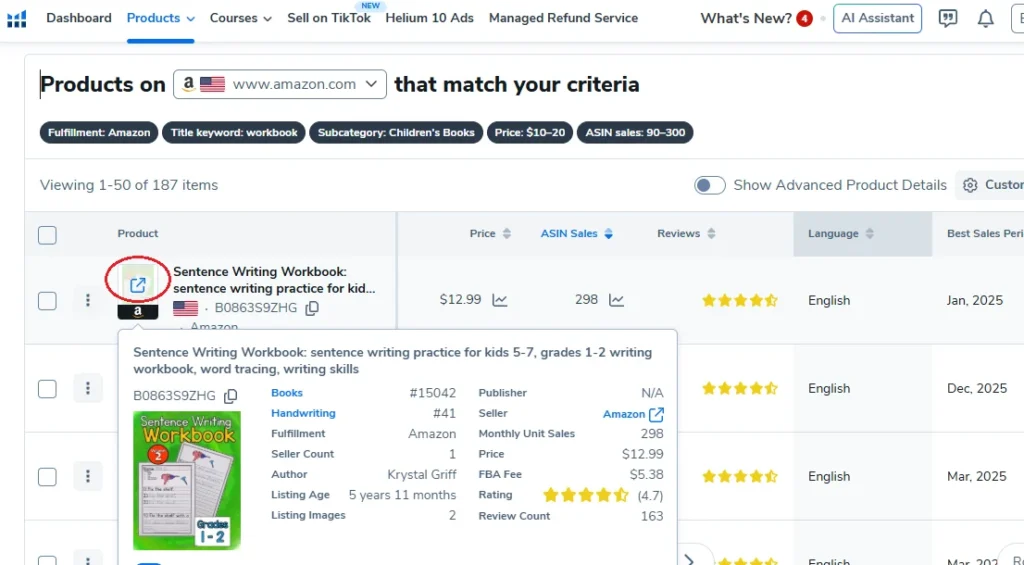
The next step is to analyze the keywords driving sales to this book. To do that, you can view this book on Amazon, just bright you mouse to the little book cover image and helium 10 will show a little arrow to open and see this book on Amazon.
👉 Want to try Helium 10 tools yourself? Get up to 40% using THIS LINK.
Step 2: Check Keyword Demand Using Cerebro
To find the keywords that bring traffic to any give book, we will be running that book through Helium 10 Cerebro.
If you have the Helium 10 Chrome extension installed, you can simply:
- Open the book’s Amazon listing
- Click the Helium 10 extension bar
- Select Keywords
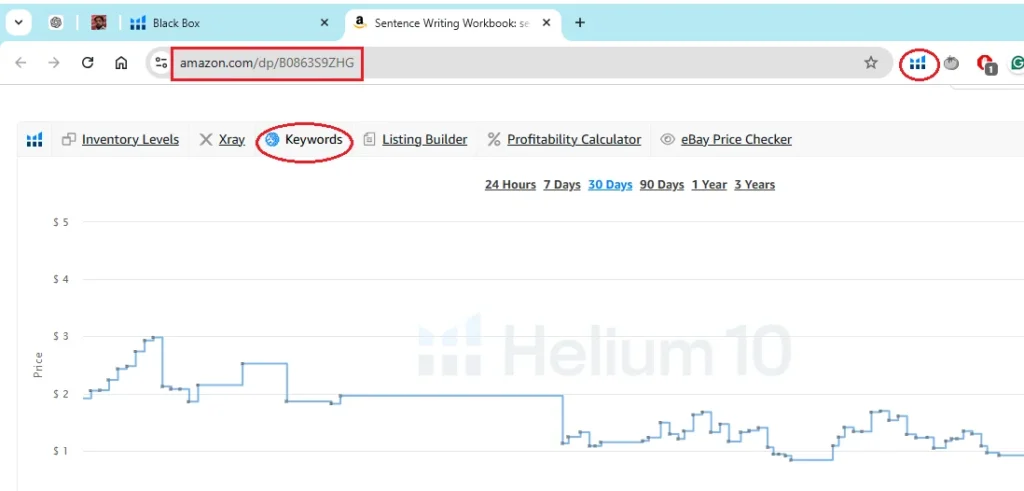
This will load the product/book directly into Cerebro which helps you find the top keywords bringing sales this book. In this example, the Sentence Writing Workbook had over 660 total keywords.
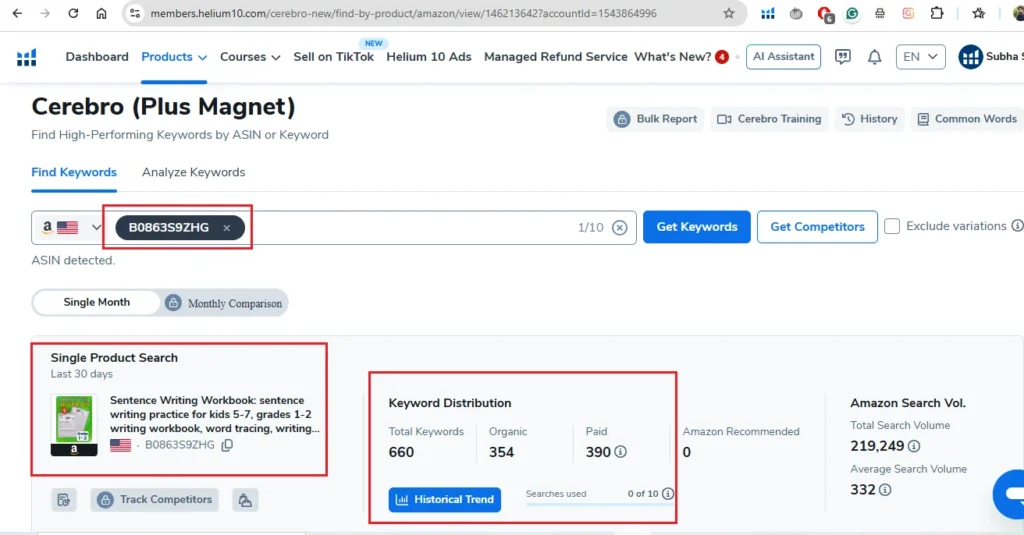
But we only care about keywords with real search demand.
Apply This Filter
Set the Search Volume filter to:
Minimum: 1,000 searches per month
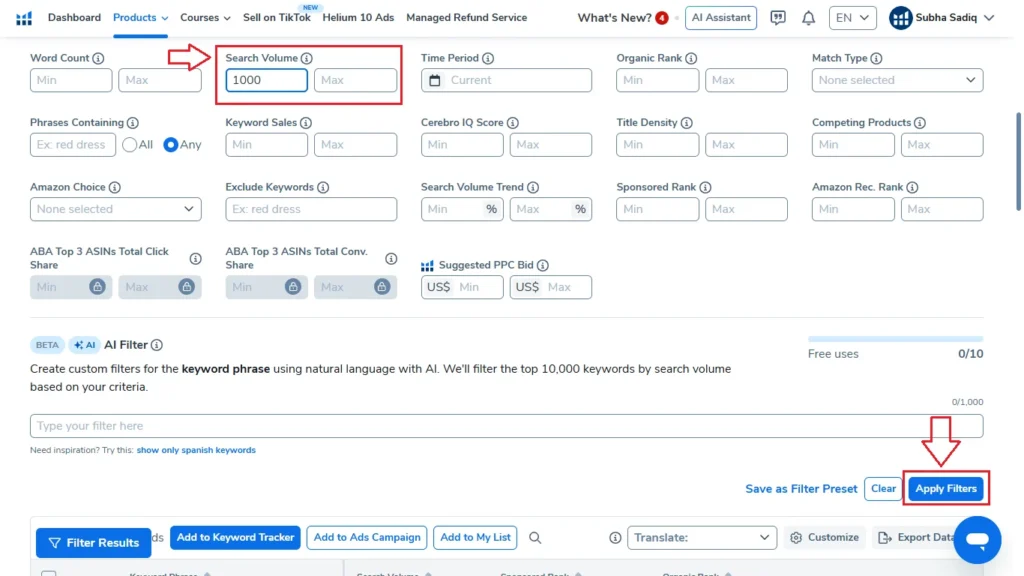
This shows us keywords that people are actually searching for and removes the low search volume keywords.
Now customize your view so you only see:
- Search Volume
- Sponsored Rank
- Organic Rank
The organic rank is the most important metric because it shows which keywords are actually bringing sales.
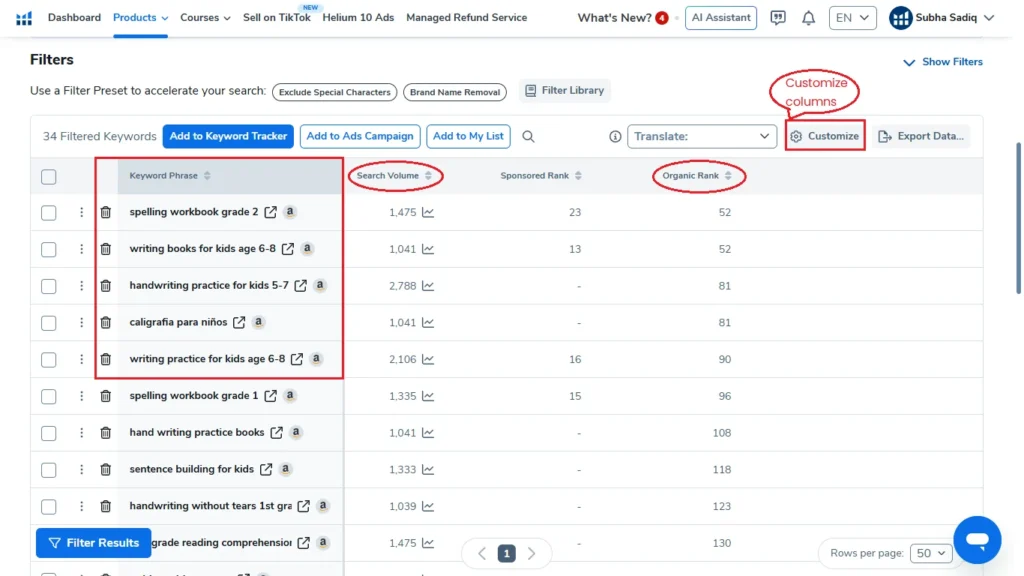
For example, I found these keywords:
- Spelling workbook grade 2
- Writing books for kids age 6 to 8
- Writing practice for kids age 6-8
The keyword “Spelling Workbook Grade 2” looked especially promising.
Now we move to the final step: analyzing the competition.
Step 3: Analyze Competition with Helium 10 X-Ray
Now we want to see if this keyword is too competitive or still open for new books.
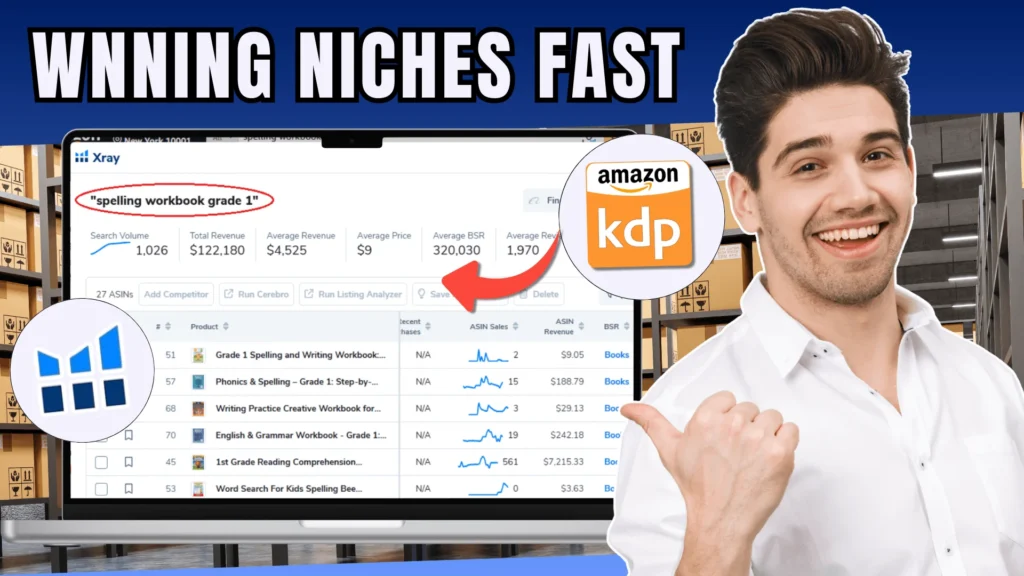
Search the keyword on Amazon: Spelling Workbook Grade 2
Then open the Helium 10 Chrome extension and click:
X-Ray → Amazon Product Research
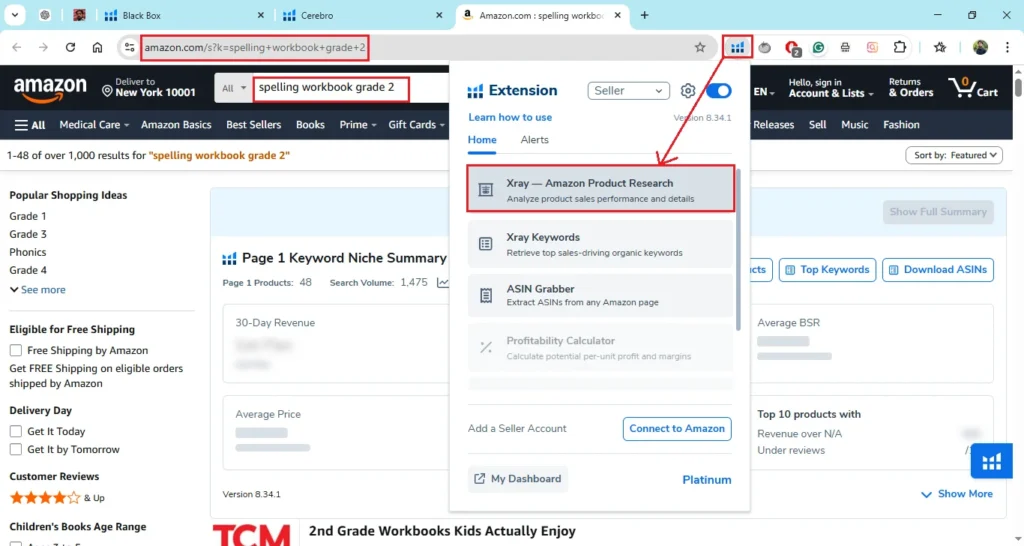
The tool will load data from the first page of search results which we can analyze to make an informed decision about publishing a workbook in this niche.
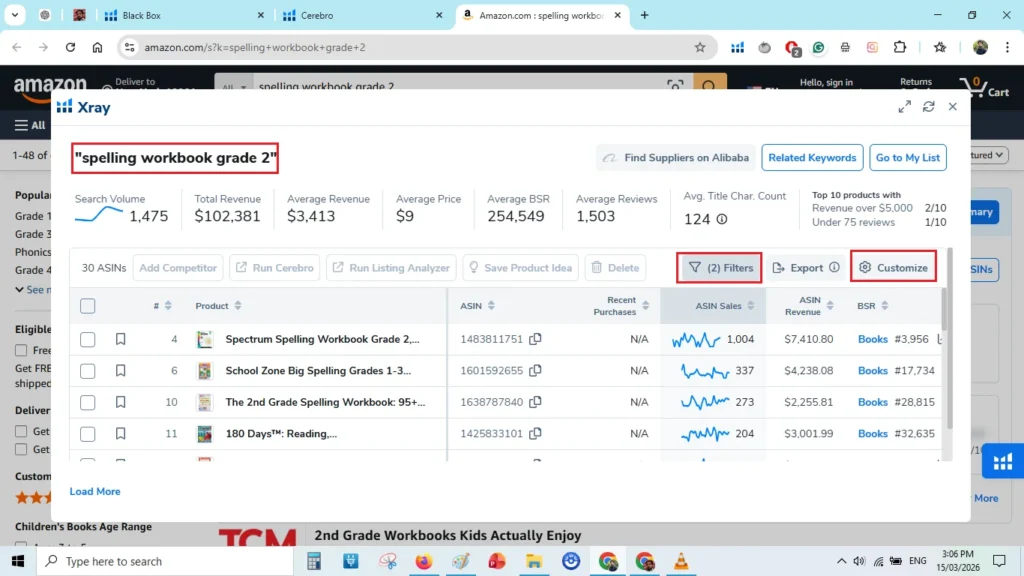
Apply These Filters
To analyze the niche properly, apply these two filters:
- Hide Sponsored Products
- Fulfilled by Amazon
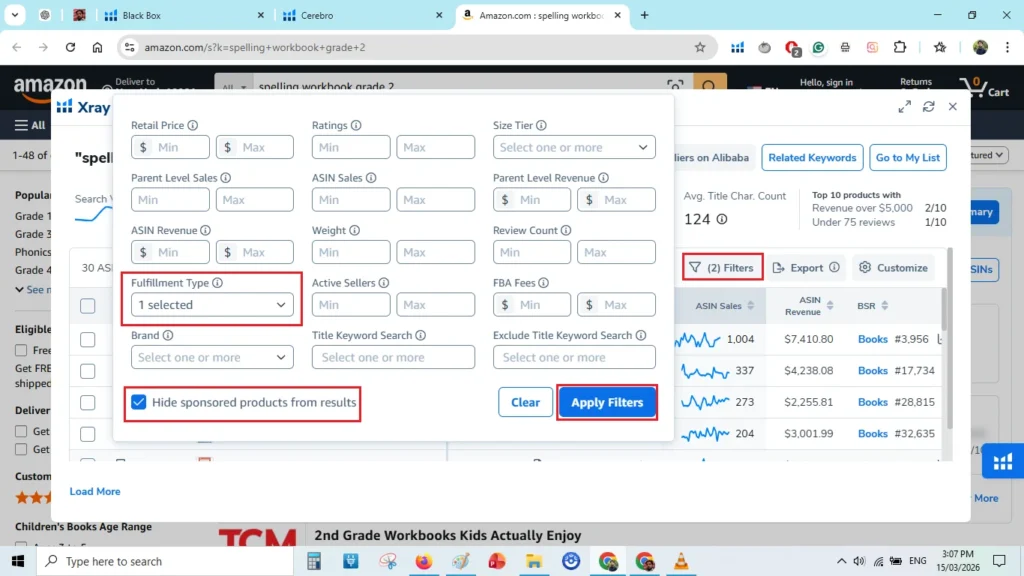
This allows us to analyze organic results and self-published books only.
Customize Columns
To make analysis easier, keep only these columns:
- ASIN
- Recent Purchases
- Sales
- Revenue
- BSR
- Reviews
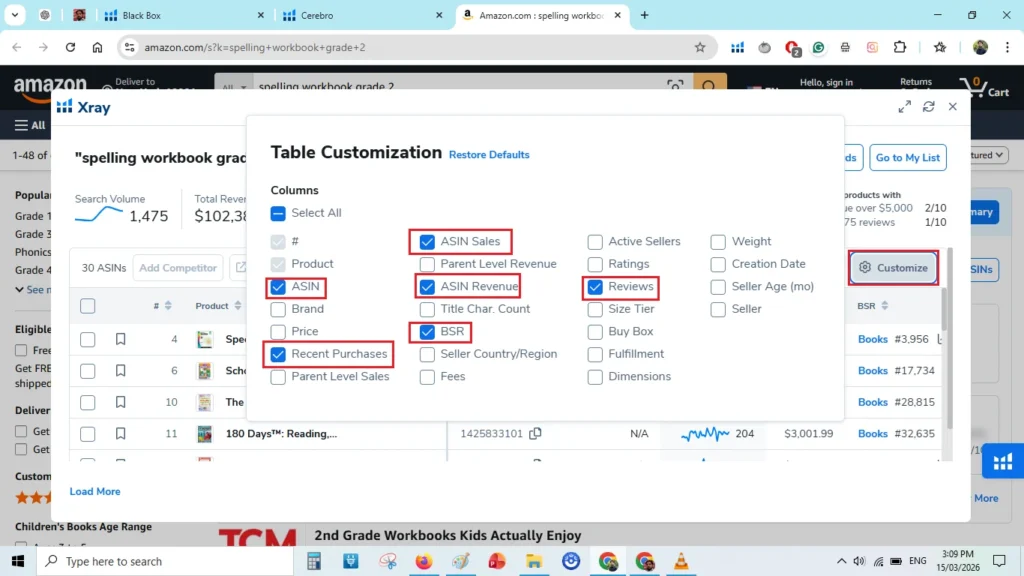
Now we can quickly see the market data.
Example Metrics
For this keyword:
- Search volume: 1,475
- Total revenue: $102,381
- Average revenue: $3,413
- Average price: $9
Now you can sort these results by ASIN Revenue to have an idea of over sales numbers and revenue distribution. Here we are looking for multiple books with preferably less number of reviews making a decent monthly revenue.
To do than you can also sort these results by Reviews low-to-high and see if books will less reviews are getting sales are not.
In this specific example spelling workbook grade 2, I can see multiple books are generating decently monthly revenue even with fewer reviews.
More importantly, the revenue distribution looked healthy.
This means multiple books were making sales instead of just one or two dominating the market.
Look at Review Counts (This Is Critical)
To understand competition, sort the products by reviews from lowest to highest.
Here’s what I noticed:
- One book had 3 reviews and made $232 last month
- Another had 4 reviews and made $226
- Another made $438
- Another made $1,600+
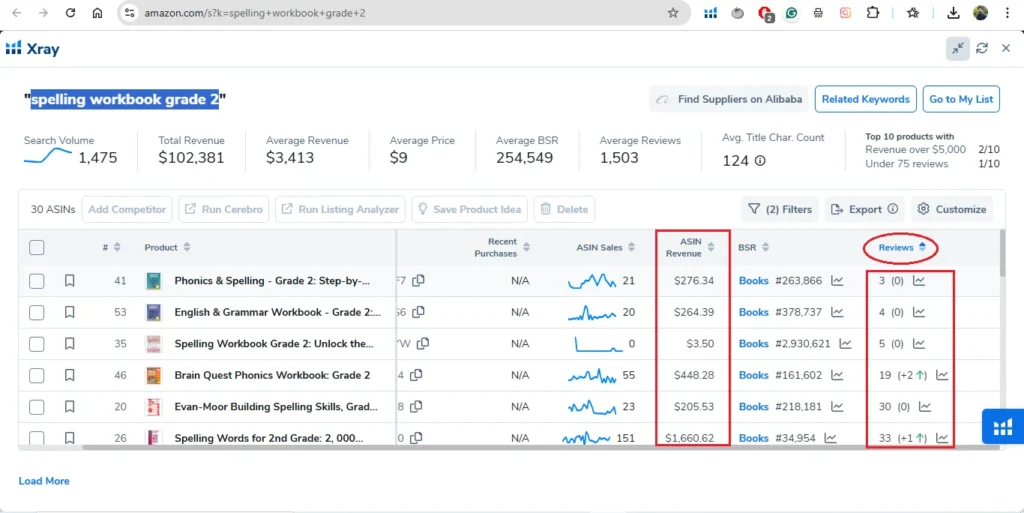
When books with very few reviews are still making sales, it’s a strong signal that the niche is still open.
That’s why Spelling Workbook Grade 2 looked like a solid niche.
Another Example: Kindergarten Math Workbook
Next, I analyzed the keyword:
Kindergarten Math Workbook
Using the same process:
- Open the product listing
- Extract keywords with Cerebro
- Apply the 1,000 search volume filter
Top keywords included:
- Kindergarten math workbook
- Kindergarten math
Then I ran the keyword through Helium 10 X-Ray.
Market Overview
- Total revenue: $300,000+
- Average BSR: 59,000
However, most of the revenue was concentrated in the top 4–5 products.
This makes the niche more competitive, although some books with low reviews were still making sales.
So it could still be worth testing, but it’s not as open as the previous niche.
Another Example: Handwriting Practice for Adults
I also analyzed this keyword:
Handwriting Practice for Adults
After running it through X-Ray, I found:
- Multiple books making $10,000+ per month
- Several books making $5,000+ per month
Even more interesting, some books with very low reviews were still earning money.
For example:
- A book with 0 reviews made $107
- Another with 8 reviews made $100+
- A book with 26 reviews made $2,600+
This indicates that new books can still enter this niche and compete.
So this looked like another very promising niche.
My Simple 3-Step KDP Niche Research Workflow
Here’s the exact workflow I follow:
Step 1 — Generate Ideas
Use Helium 10 Black Box with filters like:
- Category: Books
- Title keyword: Workbook
- Price: $10–$20
- Sales: 90–300
- Fulfilled by Amazon
Step 2 — Validate Demand
Use Cerebro to find keywords with:
- Search volume of at least 1,000
Step 3 — Check Competition
Use Helium 10 X-Ray to analyze:
- Revenue distribution
- Sales
- Review counts
- BSR
If books with low reviews are still making money, the niche may still be open.
Final Thoughts
Finding a profitable niche doesn’t have to take hours.
Using Black Box, Cerebro, and X-Ray together, you can quickly validate whether a niche has:
- Real demand
- Manageable competition
- Healthy revenue distribution
This process allows you to spot opportunities before the market becomes too crowded.
👉 If you want to try the tools yourself, you can get up to 40% off Helium 10 using THIS LINK.
It’s one of the most powerful tools for Amazon KDP niche research.
If you found this guide helpful, feel free to check out more tutorials on Amazon KDP, niche research, and passive income ideas.
🧮 Create Math Workbooks in Minutes
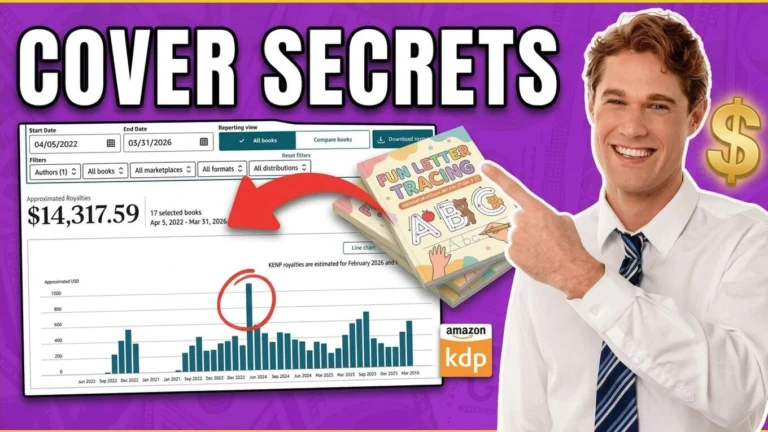
I’ve been using Math Worksheets Generator to create math workbooks super fast — and it’s a total game changer! So far, I’ve created 17 books (16 live on Amazon) and made over $14,000 in royalties.
The vendor recently introduced a monthly subscription, but the lifetime deal is still available — and it might be discontinued soon.
Get Math Worksheets GeneratorAffiliate disclaimer: I may earn a small commission if you purchase through my link — at no extra cost to you.