How to Create a Large Print Sudoku Puzzle Book That Sells on Amazon (Step-by-Step)
Last updated on March 17th, 2026 at 05:22 pm
Large print Sudoku puzzle books are selling extremely well on Amazon, especially for adults and seniors.
In this guide, I’ll show you real market data, profitable sub-niches, and exactly how to create a large print Sudoku book fast using puzzle generator tools—without manually designing each page.
Proof: Large Print Sudoku Books Are Making Serious Money
Before creating any book, it’s important to validate demand.
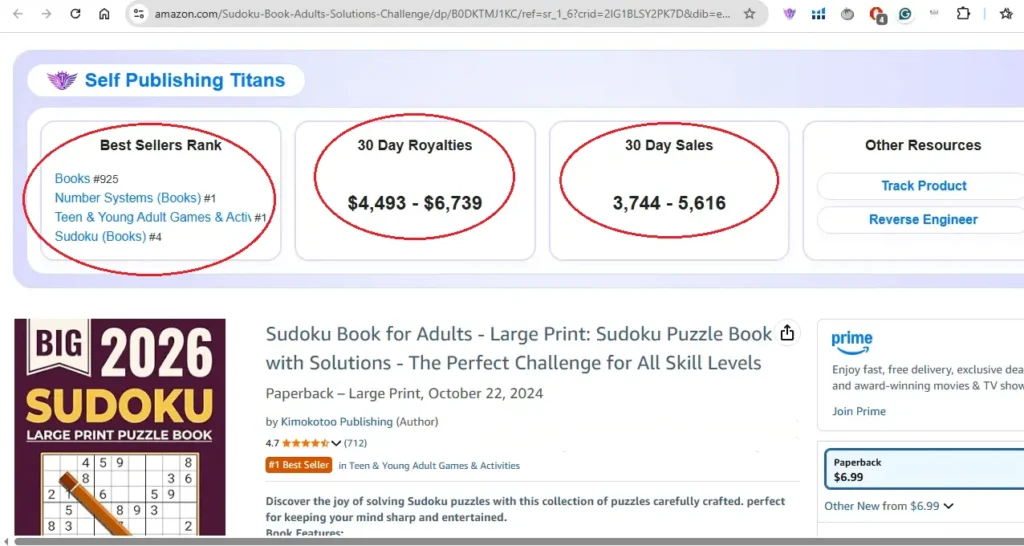
Using Self-Publishing Titans Pro, I analysed a large print Sudoku puzzle book currently ranking around #925 in the entire Amazon Books category.
🎁 Download 15 FREE KDP Interior Templates
Save time and create beautiful low-content books faster with these 15 ready-to-use KDP interiors — completely free! Perfect for journals, planners, and activity books.
Here’s what the data shows:
- Estimated 30-day royalties: $4,493 – $6,739
- Consistent daily unit sales
- Book type: Large Print Sudoku for Adults
- Updated year on cover (2026)
I also found another similar Sudoku book earning:
- $500 – $761 in the last 30 days
These are estimate numbers, but they clearly show strong demand and buying intent.
How I Quickly Find Profitable KDP Niche Ideas Using Titans Pro
You may like this post where I shared a simple yet effective way I use to find low-competition, profitable KDP niche ideas fast!
Why Large Print Sudoku Is a Powerful Niche
Large print puzzle books are especially popular among:
- Seniors
- Adults who prefer easy-to-read layouts
- Brain game enthusiasts
Using keyword data from Self-Publishing Titans Pro and Helium 10, I found several profitable sub-niches:
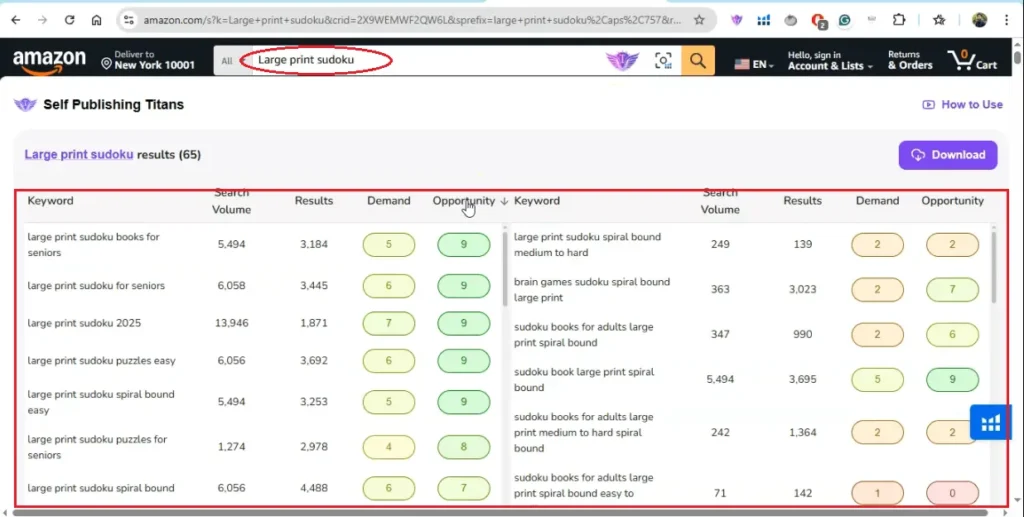
High-Potential Sub-Niche Ideas
- Large print Sudoku for seniors
- Easy large print Sudoku puzzles
- Large print Sudoku 2025 / 2026
- Extra large print Sudoku for seniors
- Large print brain games
- Easy, Medium, Hard Sudoku difficulty books
⚠️ Note: Spiral-bound books cannot be published via Amazon KDP.
Tools Used to Research and Create the Book
To speed up the process, I use Cloudorkra Puzzle Apps, which provide:
- Sudoku puzzle generators
- Word search generators
- Cryptogram & logic puzzle generators
- Bulk page creation tools
You can access everything through a monthly subscription, or get lifetime access to just the Sudoku generator if you prefer.
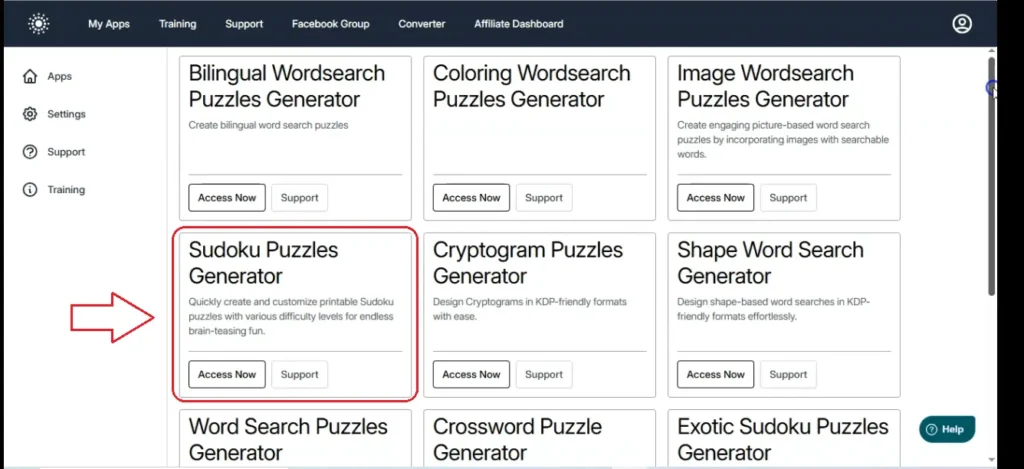
Step 1: Set Up Your Sudoku Book Layout
Inside Cloudora Puzzle Apps:
- Open Sudoku Puzzle Generator
- Create a new collection (e.g., “Large Print Sudoku”)
- Choose 9×9 Sudoku (this is what sells best)
- Page size: 8.5 × 11 inches (perfect for large print)
- Adjust margins:
- Inside margin: 0.6 to 0.7 In
- Top & bottom: 0.5 In
- Enable page numbers (optional)
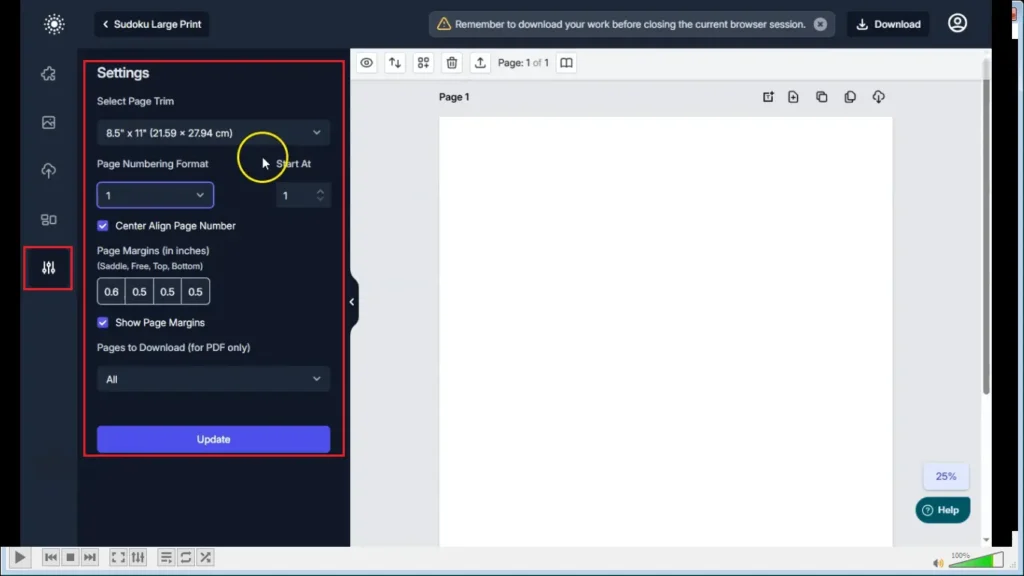
Once set, your layout will automatically mirror properly on duplicated pages.
👉 You may like to check out my blog post about the Powerpoint Puzzle Generator, that an extremely helpful tool for creating puzzles within Powerpoint within minutes!
Step 2: Create Easy Large Print Sudoku Pages
To add a Sudoku puzzle on page, go to puzzle templates from the top left and click on the 9×9 puzzle option. You can also add, 4 x 4 and 6 x 6.
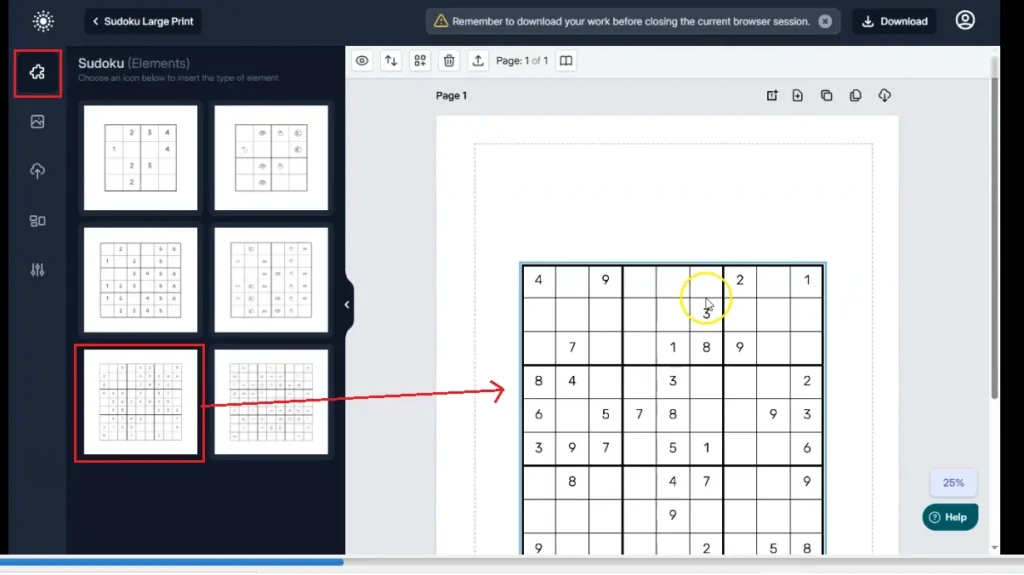
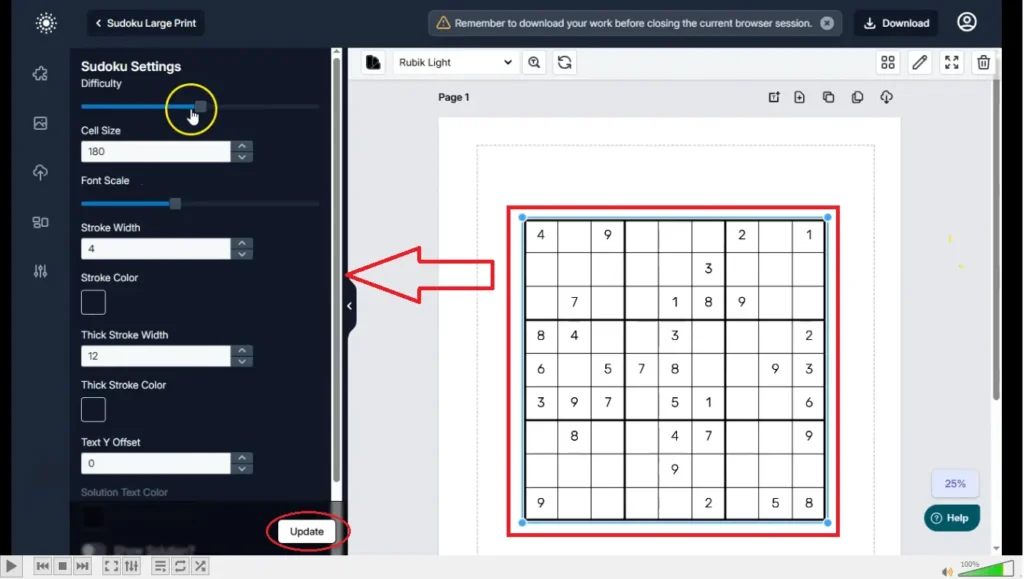
Recommended Large Print Settings
- Difficulty: Easy
- Stroke width: 5–6
- Stroke thickness: 10–11
- Large font size for numbers
Layout Options
- 1 puzzle per page (extra large print)
- 2 puzzles per page (still senior-friendly)
Add a title like:
Easy Sudoku Puzzle #1
Step 3: Bulk Clone Pages (Huge Time Saver)
To create the puzzle book superfast for Amazon KDP, you can use the bulk clone feature. This is an advance feature and only available on the pro version or monthly subscription.
Note: If you only have the front end version of Sudoku Generator, you can use the Clone feature and create pages one by one.
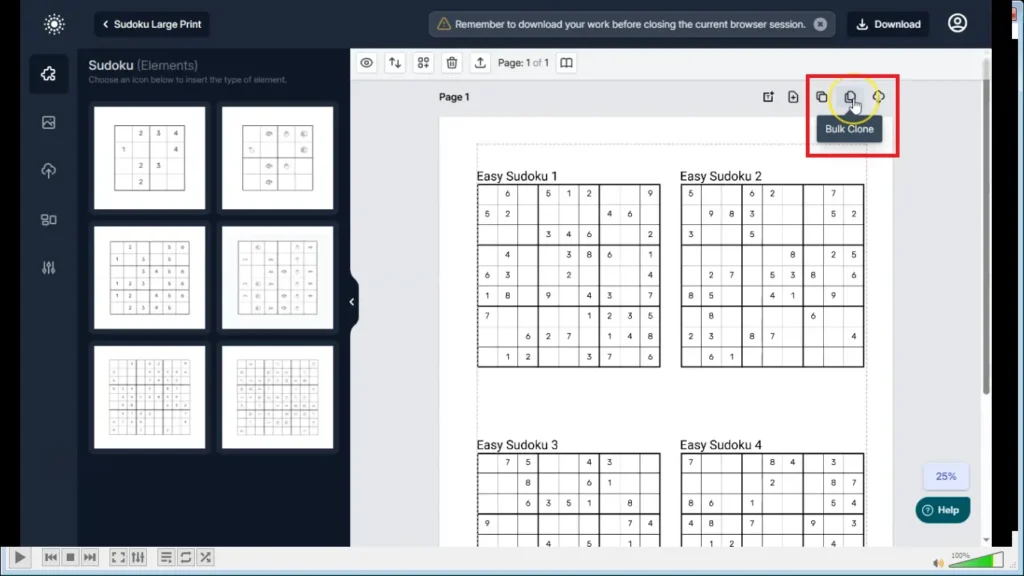
To make things faster, Instead of creating puzzles one by one:
- Use Bulk Clone
- Example:
- Total pages: 20
- Page numbering starts at 2
- Puzzle numbers auto-increment
✅ In seconds, you’ll have 20 easy Sudoku pages ready.
Step 4: Create Medium & Hard Sudoku Sections
To create medium or hard Sudoku pages, you just need to increase the difficult level (from left to right).
Now repeat the process:
Medium Sudoku
- Change difficulty to Medium
- Match all sizing and font settings from Easy pages
- Bulk clone another 20 pages
Hard Sudoku
- Change difficulty to Hard
- Use 1 puzzle per page
- Increase puzzle size further for clarity
- Bulk clone 20 pages
At this point, you have:
- 20 Easy puzzles
- 20 Medium puzzles
- 20 Hard puzzles
That’s already a 60-page large print Sudoku book.
Step 5: Optional – Rapid Book Generator Method
Cloudora also offers a Rapid Book Generator if you want speed over customization.
With this tool, you can:
- Choose grid layout (1×1, 1×2, etc.)
- Select difficulty (Easy, Medium, Hard)
- Automatically generate:
- 25 Easy pages
- 25 Medium pages
- 25 Hard pages
⚠️ Tip: Titles and fonts may appear smaller. You can:
- Customize one page
- Bulk clone it for consistent formatting
Which Method Is Better?
| Method | Best For |
|---|---|
| Manual + Bulk Clone | Maximum control, better large print quality |
| Rapid Book Generator | Speed, fast book creation |
For premium large print Sudoku books, I recommend the manual + bulk clone method.
👉 Sudoku Book Generator (lifetime): https://lowcontentprofits.com/sudoku-book-generator
👉Cloudorka Puzzle Apps (Monthly): https://lowcontentprofits.com/puzzle-apps
Final Thoughts
Large print Sudoku puzzle books are:
- In high demand
- Beginner-friendly to create
- Perfect for scaling into a series or brand
With the right tools, you can create a 100+ page Sudoku book in a single day—without designing everything manually.
If you want to check out the puzzle apps I used, you’ll find links in the description. There are monthly plans and lifetime options depending on your goals.
If you have any questions, feel free to ask. Happy publishing 🚀
Subha
👉 If you want to go deeper into KDP niche & keyword research, check out my complete guide on finding low-competition Amazon KDP niches using Helium 10. In this step-by-step tutorial, I show exactly how to uncover profitable book ideas, validate demand, and analyze competition before you publish.
Want to Publish Your First Amazon KDP Book the Right Way?
I created a beginner-friendly Amazon KDP course that walks you through niche research, book creation, and publishing — step by step.
👉 Access the Amazon KDP MasterclassPerfect for beginners starting with low- and medium-content books.